HardwareHandheldsThe best Steam Deck accessories 2024: handy handheld add-onsWhen you purchase through links on our site, we may earn an affiliate commission.Here’s how it works.
HardwareHandheldsThe best Steam Deck accessories 2024: handy handheld add-onsWhen you purchase through links on our site, we may earn an affiliate commission.Here’s how it works.
When you purchase through links on our site, we may earn an affiliate commission.Here’s how it works.
(Image credit: Future / Phil Hayton)

Jump to:The Quick ListBest caseBest screen protectorBest caseBest power bankBest controllerBest chargerBest headsetBest keyboardBest mouseBest SSDBest microSDFAQ
Jump to:The Quick ListBest caseBest screen protectorBest caseBest power bankBest controllerBest chargerBest headsetBest keyboardBest mouseBest SSDBest microSDFAQ
The best Steam Deck accessories are worth browsing if you happen to ownValve’s portable powerhouse. Not only will it provide the mini gaming machine with everything it needs to shine, but add-ons will protect your Deck, expand its storage, and give it extra abilities. From docking stations that’ll turn it into a hybrid rig to power banks that will keep you in-game for longer, we’ve tested plenty of gadgets that’ll pair perfectly with the portable powerhouse.
If you’ve ever owned one of thebest gaming handheldoptions, even during the glory days of the Game Boy, you’ll know that portables are normally compatible with a bunch of accessories. While a lot has changed since Nintendo’s 8-bit brick dominated the scene, the same still applies to brand-new contenders like theSteam Deck OLED, even if the portable’s add-ons have more in common with laptop and PC extras. A quick search online will reveal a whole bunch of compatible cases, docks, storage options, and protective bits and bobs, but it’s not always easy to tell what add-ons are worth your time at a glance.
We’ve tried and tested the best Steam Deck accessories to aid you in equipping Valve’s heroic handheld with an excellent arsenal. It’s worth noting that if you’ve got anAsusROG Ally orLenovoLegion GO, some of our picks below will work with those portable rivals, as extras like a Steam Deck dock will happily work with most portable gaming PCs with a USB-C port. You’ll also want to make sure to check back here regularly for updates, as new accessories will continue to arrive in 2024 and beyond.
Phil HaytonHardware editorPhil is somewhat of a Steam Deck accessories expert, having tested the latest docks and add-ons from the very beginning. They also love to come up with creative portable PC setups you can take on the go, so you can rest assured their top add-ons are worth permanently keeping in your backpack.
Phil HaytonHardware editorPhil is somewhat of a Steam Deck accessories expert, having tested the latest docks and add-ons from the very beginning. They also love to come up with creative portable PC setups you can take on the go, so you can rest assured their top add-ons are worth permanently keeping in your backpack.
Phil HaytonHardware editor
Phil Hayton
Phil is somewhat of a Steam Deck accessories expert, having tested the latest docks and add-ons from the very beginning. They also love to come up with creative portable PC setups you can take on the go, so you can rest assured their top add-ons are worth permanently keeping in your backpack.
Phil is somewhat of a Steam Deck accessories expert, having tested the latest docks and add-ons from the very beginning. They also love to come up with creative portable PC setups you can take on the go, so you can rest assured their top add-ons are worth permanently keeping in your backpack.
The Quick List
Best case1. Jsaux ModcaseView at AmazonView at AmazonView at AmazonThe best caseSuperb, modular armor for your Deck with added modular capabilities round the back.Read more belowBest screen protector2. Jsaux Screen ProtectorView at AmazonView at AmazonThe best screen protectorA low-cost way to avoid screen scratches and provide a protective barrier for the Deck’s front.Read more belowBest dock3. Baseus 6-in-1 docking stationView at AmazonThe best dockA fantastic hub with plenty of ports and an adjustable cradle that’ll accommodate your Steam Deck case or shell.Read more belowBest power bank4. Jsaux 20000mAh 65wView at AmazonThe best power bankA great way to extend your Steam Deck playtime that will take up less room and provide the handheld with the right amount of juice. especially when on the go.Read more belowBest controller5. Asus ROG Raikiri ProView at AmazonView at Best BuyView at AmazonThe best controllerThis controller offers up comfort, style, and connectivity.Read more belowBest charger6. Acefast Power Station Z4Check AmazonThe best chargerIf you need a way to charge your Deck and all its accessories, this hub will check all the boxes.Read more below
Best case1. Jsaux ModcaseView at AmazonView at AmazonView at AmazonThe best caseSuperb, modular armor for your Deck with added modular capabilities round the back.Read more below
Best case
Best case

-
Jsaux ModcaseView at AmazonView at AmazonView at AmazonThe best caseSuperb, modular armor for your Deck with added modular capabilities round the back.Read more below
-
Jsaux Modcase
-
Jsaux Modcase
View at AmazonView at AmazonView at AmazonThe best caseSuperb, modular armor for your Deck with added modular capabilities round the back.Read more below
View at AmazonView at AmazonView at Amazon
View at AmazonView at AmazonView at Amazon
View at AmazonView at AmazonView at Amazon
View at AmazonView at AmazonView at Amazon
View at Amazon
View at Amazon
View at Amazon
View at Amazon
View at Amazon
View at Amazon
The best case
Superb, modular armor for your Deck with added modular capabilities round the back.
Read more below
Best screen protector2. Jsaux Screen ProtectorView at AmazonView at AmazonThe best screen protectorA low-cost way to avoid screen scratches and provide a protective barrier for the Deck’s front.Read more below
Best screen protector
Best screen protector
-
Jsaux Screen ProtectorView at AmazonView at AmazonThe best screen protectorA low-cost way to avoid screen scratches and provide a protective barrier for the Deck’s front.Read more below
-
Jsaux Screen Protector
-
Jsaux Screen Protector
View at AmazonView at AmazonThe best screen protectorA low-cost way to avoid screen scratches and provide a protective barrier for the Deck’s front.Read more below
View at AmazonView at Amazon
View at AmazonView at Amazon
View at AmazonView at Amazon
View at AmazonView at Amazon
View at Amazon
View at Amazon
View at Amazon
View at Amazon
The best screen protector
A low-cost way to avoid screen scratches and provide a protective barrier for the Deck’s front.
Read more below
Best dock3. Baseus 6-in-1 docking stationView at AmazonThe best dockA fantastic hub with plenty of ports and an adjustable cradle that’ll accommodate your Steam Deck case or shell.Read more below
Best dock
Best dock
-
Baseus 6-in-1 docking stationView at AmazonThe best dockA fantastic hub with plenty of ports and an adjustable cradle that’ll accommodate your Steam Deck case or shell.Read more below
-
Baseus 6-in-1 docking station
-
Baseus 6-in-1 docking station
View at AmazonThe best dockA fantastic hub with plenty of ports and an adjustable cradle that’ll accommodate your Steam Deck case or shell.Read more below
View at Amazon
View at Amazon
View at Amazon
View at Amazon
View at Amazon
View at Amazon
The best dock
A fantastic hub with plenty of ports and an adjustable cradle that’ll accommodate your Steam Deck case or shell.
Read more below
Best power bank4. Jsaux 20000mAh 65wView at AmazonThe best power bankA great way to extend your Steam Deck playtime that will take up less room and provide the handheld with the right amount of juice. especially when on the go.Read more below
Best power bank
Best power bank

-
Jsaux 20000mAh 65wView at AmazonThe best power bankA great way to extend your Steam Deck playtime that will take up less room and provide the handheld with the right amount of juice. especially when on the go.Read more below
-
Jsaux 20000mAh 65w
-
Jsaux 20000mAh 65w
View at AmazonThe best power bankA great way to extend your Steam Deck playtime that will take up less room and provide the handheld with the right amount of juice. especially when on the go.Read more below
View at Amazon
View at Amazon
View at Amazon
View at Amazon
View at Amazon
View at Amazon
The best power bank
A great way to extend your Steam Deck playtime that will take up less room and provide the handheld with the right amount of juice. especially when on the go.Read more below
Best controller5. Asus ROG Raikiri ProView at AmazonView at Best BuyView at AmazonThe best controllerThis controller offers up comfort, style, and connectivity.Read more below
Best controller
Best controller

-
Asus ROG Raikiri ProView at AmazonView at Best BuyView at AmazonThe best controllerThis controller offers up comfort, style, and connectivity.Read more below
-
Asus ROG Raikiri Pro
-
Asus ROG Raikiri Pro
View at AmazonView at Best BuyView at AmazonThe best controllerThis controller offers up comfort, style, and connectivity.Read more below
View at AmazonView at Best BuyView at Amazon
View at AmazonView at Best BuyView at Amazon
View at AmazonView at Best BuyView at Amazon
View at AmazonView at Best BuyView at Amazon
View at Amazon
View at Amazon
View at Best Buy
View at Best Buy
View at Amazon
View at Amazon
The best controller
This controller offers up comfort, style, and connectivity.
Read more below
Best charger6. Acefast Power Station Z4Check AmazonThe best chargerIf you need a way to charge your Deck and all its accessories, this hub will check all the boxes.Read more below
Best charger
Best charger
-
Acefast Power Station Z4Check AmazonThe best chargerIf you need a way to charge your Deck and all its accessories, this hub will check all the boxes.Read more below
-
Acefast Power Station Z4
-
Acefast Power Station Z4
Check AmazonThe best chargerIf you need a way to charge your Deck and all its accessories, this hub will check all the boxes.Read more below
Check Amazon
Check Amazon
Check Amazon
Check Amazon
Check Amazon
Check Amazon
The best charger
If you need a way to charge your Deck and all its accessories, this hub will check all the boxes.
Read more below
Load the next 5 products ↓Best headset7. Razer Barracuda XView at RazerCheck AmazonThe best headsetA versatile pair of cans that’ll pair with Valve’s portable and other devices without a hitch,Read more belowBest keyboard7. Cherry MX-LP 2.1View at AmazonThe best keyboardThis smaller keeb is perfect for compact Steam Deck desktop setups both at home and on the go.Read more belowBest mouse8. Razer Orochi V2View at AmazonView at WalmartView at RazerThe best Steam Deck mouseIt’s lightweight, packs Bluetooth, and pairing it with your Steam Deck won’t break the bank.Read more belowBest SSD9. WD Black SN770MView at AmazonView at WalmartView at Best BuyThe Best SSDThis 2230 drive will expand your internal storage and help you take more of your Steam library on the go.Read more belowBest microSD10. SanDisk Ultra microSDXC 1.5TBView at AmazonView at AmazonThe best microSD cardIf you’d rather not crack open your expensive handheld, this SD card will quickly add heaps of speedy external storage.Read more below
Load the next 5 products ↓
Load the next 5 products ↓
Best headset7. Razer Barracuda XView at RazerCheck AmazonThe best headsetA versatile pair of cans that’ll pair with Valve’s portable and other devices without a hitch,Read more belowBest keyboard7. Cherry MX-LP 2.1View at AmazonThe best keyboardThis smaller keeb is perfect for compact Steam Deck desktop setups both at home and on the go.Read more belowBest mouse8. Razer Orochi V2View at AmazonView at WalmartView at RazerThe best Steam Deck mouseIt’s lightweight, packs Bluetooth, and pairing it with your Steam Deck won’t break the bank.Read more belowBest SSD9. WD Black SN770MView at AmazonView at WalmartView at Best BuyThe Best SSDThis 2230 drive will expand your internal storage and help you take more of your Steam library on the go.Read more belowBest microSD10. SanDisk Ultra microSDXC 1.5TBView at AmazonView at AmazonThe best microSD cardIf you’d rather not crack open your expensive handheld, this SD card will quickly add heaps of speedy external storage.Read more below
Best headset7. Razer Barracuda XView at RazerCheck AmazonThe best headsetA versatile pair of cans that’ll pair with Valve’s portable and other devices without a hitch,Read more below
Best headset
Best headset

-
Razer Barracuda XView at RazerCheck AmazonThe best headsetA versatile pair of cans that’ll pair with Valve’s portable and other devices without a hitch,Read more below
-
Razer Barracuda X
-
Razer Barracuda X
View at RazerCheck AmazonThe best headsetA versatile pair of cans that’ll pair with Valve’s portable and other devices without a hitch,Read more below
View at RazerCheck Amazon
View at RazerCheck Amazon
View at RazerCheck Amazon
View at RazerCheck Amazon
View at Razer
View at Razer
Check Amazon
Check Amazon
The best headset
A versatile pair of cans that’ll pair with Valve’s portable and other devices without a hitch,
Read more below
Best keyboard7. Cherry MX-LP 2.1View at AmazonThe best keyboardThis smaller keeb is perfect for compact Steam Deck desktop setups both at home and on the go.Read more below
Best keyboard
Best keyboard
-
Cherry MX-LP 2.1View at AmazonThe best keyboardThis smaller keeb is perfect for compact Steam Deck desktop setups both at home and on the go.Read more below
-
Cherry MX-LP 2.1
-
Cherry MX-LP 2.1
View at AmazonThe best keyboardThis smaller keeb is perfect for compact Steam Deck desktop setups both at home and on the go.Read more below
View at Amazon
View at Amazon
View at Amazon
View at Amazon
View at Amazon
View at Amazon
The best keyboard
This smaller keeb is perfect for compact Steam Deck desktop setups both at home and on the go.
Read more below
Best mouse8. Razer Orochi V2View at AmazonView at WalmartView at RazerThe best Steam Deck mouseIt’s lightweight, packs Bluetooth, and pairing it with your Steam Deck won’t break the bank.Read more below
Best mouse
Best mouse

-
Razer Orochi V2View at AmazonView at WalmartView at RazerThe best Steam Deck mouseIt’s lightweight, packs Bluetooth, and pairing it with your Steam Deck won’t break the bank.Read more below
-
Razer Orochi V2
-
Razer Orochi V2
View at AmazonView at WalmartView at RazerThe best Steam Deck mouseIt’s lightweight, packs Bluetooth, and pairing it with your Steam Deck won’t break the bank.Read more below
View at AmazonView at WalmartView at Razer
View at AmazonView at WalmartView at Razer
View at AmazonView at WalmartView at Razer
View at AmazonView at WalmartView at Razer
View at Amazon
View at Amazon
View at Walmart
View at Walmart
View at Razer
View at Razer
The best Steam Deck mouse
It’s lightweight, packs Bluetooth, and pairing it with your Steam Deck won’t break the bank.Read more below
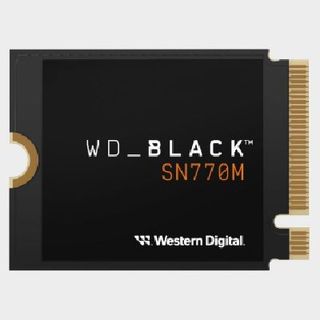
Best SSD9. WD Black SN770MView at AmazonView at WalmartView at Best BuyThe Best SSDThis 2230 drive will expand your internal storage and help you take more of your Steam library on the go.Read more below
Best SSD
Best SSD
-
WD Black SN770MView at AmazonView at WalmartView at Best BuyThe Best SSDThis 2230 drive will expand your internal storage and help you take more of your Steam library on the go.Read more below
-
WD Black SN770M
-
WD Black SN770M
View at AmazonView at WalmartView at Best BuyThe Best SSDThis 2230 drive will expand your internal storage and help you take more of your Steam library on the go.Read more below
View at AmazonView at WalmartView at Best Buy
View at AmazonView at WalmartView at Best Buy
View at AmazonView at WalmartView at Best Buy
View at AmazonView at WalmartView at Best Buy
View at Amazon
View at Amazon
View at Walmart
View at Walmart
View at Best Buy
View at Best Buy
The Best SSD
This 2230 drive will expand your internal storage and help you take more of your Steam library on the go.
Read more below
Best microSD10. SanDisk Ultra microSDXC 1.5TBView at AmazonView at AmazonThe best microSD cardIf you’d rather not crack open your expensive handheld, this SD card will quickly add heaps of speedy external storage.Read more below
Best microSD
Best microSD

-
SanDisk Ultra microSDXC 1.5TBView at AmazonView at AmazonThe best microSD cardIf you’d rather not crack open your expensive handheld, this SD card will quickly add heaps of speedy external storage.Read more below
-
SanDisk Ultra microSDXC 1.5TB
-
SanDisk Ultra microSDXC 1.5TB
View at AmazonView at AmazonThe best microSD cardIf you’d rather not crack open your expensive handheld, this SD card will quickly add heaps of speedy external storage.Read more below
View at AmazonView at Amazon
View at AmazonView at Amazon
View at AmazonView at Amazon
View at AmazonView at Amazon
View at Amazon
View at Amazon
View at Amazon
View at Amazon
The best microSD card
If you’d rather not crack open your expensive handheld, this SD card will quickly add heaps of speedy external storage.
Read more below
The best Steam Deck case
Image1of5(Image credit: Future / Phil Hayton)(Image credit: Future / Phil Hayton)(Image credit: Future / Phil Hayton)(Image credit: Future / Phil Hayton)(Image credit: Future / Phil Hayton)
Image1of5(Image credit: Future / Phil Hayton)(Image credit: Future / Phil Hayton)(Image credit: Future / Phil Hayton)(Image credit: Future / Phil Hayton)(Image credit: Future / Phil Hayton)
Image1of5
(Image credit: Future / Phil Hayton)(Image credit: Future / Phil Hayton)(Image credit: Future / Phil Hayton)(Image credit: Future / Phil Hayton)(Image credit: Future / Phil Hayton)
(Image credit: Future / Phil Hayton)(Image credit: Future / Phil Hayton)(Image credit: Future / Phil Hayton)(Image credit: Future / Phil Hayton)(Image credit: Future / Phil Hayton)
(Image credit: Future / Phil Hayton)
(Image credit: Future / Phil Hayton)
(Image credit: Future / Phil Hayton)
(Image credit: Future / Phil Hayton)
(Image credit: Future / Phil Hayton)

(Image credit: Future / Phil Hayton)
(Image credit: Future / Phil Hayton)
(Image credit: Future / Phil Hayton)
(Image credit: Future / Phil Hayton)
(Image credit: Future / Phil Hayton)
(Image credit: Future / Phil Hayton)
(Image credit: Future / Phil Hayton)
(Image credit: Future / Phil Hayton)
(Image credit: Future / Phil Hayton)
(Image credit: Future / Phil Hayton)
(Image credit: Future / Phil Hayton)
(Image credit: Future / Phil Hayton)
(Image credit: Future / Phil Hayton)
(Image credit: Future / Phil Hayton)
(Image credit: Future / Phil Hayton)
(Image credit: Future / Phil Hayton)
(Image credit: Future / Phil Hayton)
(Image credit: Future / Phil Hayton)
(Image credit: Future / Phil Hayton)
(Image credit: Future / Phil Hayton)
-
Jsaux ModCaseThe best Steam Deck caseOur expert review:Average Amazon review:☆☆☆☆☆SpecificationsDesign:ShellProtection:Hard plastic, rubber gripsStorage:Modular backstrap for add-onsToday’s Best DealsView at AmazonView at AmazonView at AmazonReasons to buy+Full cover protection+Modular system for accessories+Built-in kickstandReasons to avoid-Adds extra weight-Only comes in black
-
Jsaux ModCase
1. Jsaux ModCase
The best Steam Deck case
Our expert review:Average Amazon review:☆☆☆☆☆
Our expert review:
Our expert review:
Average Amazon review:☆☆☆☆☆
Average Amazon review:☆☆☆☆☆
Average Amazon review:☆☆☆☆☆
Average Amazon review:☆☆☆☆☆
Average Amazon review:☆☆☆☆☆
☆☆☆☆☆
SpecificationsDesign:ShellProtection:Hard plastic, rubber gripsStorage:Modular backstrap for add-ons
Design:ShellProtection:Hard plastic, rubber gripsStorage:Modular backstrap for add-ons
Design:Shell
Protection:Hard plastic, rubber grips
Storage:Modular backstrap for add-ons
Today’s Best DealsView at AmazonView at AmazonView at Amazon
Today’s Best DealsView at AmazonView at AmazonView at Amazon
Today’s Best DealsView at AmazonView at AmazonView at Amazon
Today’s Best DealsView at AmazonView at AmazonView at Amazon
Today’s Best Deals
View at AmazonView at AmazonView at Amazon
View at Amazon
View at Amazon
View at Amazon
View at Amazon
View at Amazon
View at Amazon
Reasons to buy+Full cover protection+Modular system for accessories+Built-in kickstand
+Full cover protection+Modular system for accessories+Built-in kickstand
Full cover protection
Modular system for accessories
Built-in kickstand
Reasons to avoid-Adds extra weight-Only comes in black
-Adds extra weight-Only comes in black
Adds extra weight
Only comes in black
Yes, we know, the Steam Deck comes with an exceptional case. However, the Jsaux ModCase adds modular superpowers that will make using add-ons like power banks much easier. Plus, it’ll take up less room in your backpack while offering up a layer of front armor.
Buy it if✅ You need low-profile protection:Rather than using a big zip-up clamshell design, the ModCase feels like an integrated solution with an easy access shield at the front.✅ You want modular functionality:This case’s modular strap will save you from balancing add-ons like battery banks on your knee or other precarious places.
Buy it if
✅ You need low-profile protection:Rather than using a big zip-up clamshell design, the ModCase feels like an integrated solution with an easy access shield at the front.✅ You want modular functionality:This case’s modular strap will save you from balancing add-ons like battery banks on your knee or other precarious places.
✅ You need low-profile protection:Rather than using a big zip-up clamshell design, the ModCase feels like an integrated solution with an easy access shield at the front.
✅ You want modular functionality:This case’s modular strap will save you from balancing add-ons like battery banks on your knee or other precarious places.
Don’t buy it if❌You’re happy with Valve’s case:The Steam Deck comes with an exceptional case, so if you don’t need extra functionality, there’s little point buying an additional shell❌You need storage:While this case will hold onto add-ons, it doesn’t provide anywhere to put your whole collection.
Don’t buy it if
❌You’re happy with Valve’s case:The Steam Deck comes with an exceptional case, so if you don’t need extra functionality, there’s little point buying an additional shell❌You need storage:While this case will hold onto add-ons, it doesn’t provide anywhere to put your whole collection.
❌You’re happy with Valve’s case:The Steam Deck comes with an exceptional case, so if you don’t need extra functionality, there’s little point buying an additional shell
❌You need storage:While this case will hold onto add-ons, it doesn’t provide anywhere to put your whole collection.
Features:As we’ve already spoiled, the main draw of this case is its modular rubber strap, which is designed to cling onto small accessories that you might use during play. For example, if you’re planning on playing a game that will slurp a lot of battery, you can strap in a power bank and make it feel like a part of the handheld. There are naturally limits in terms of weight, but for the most part, add-ons will stay put on back without a fuss.
Performance:I’ve used the ModCase for an extended period in various environments, and it has reliably protected my Steam Deck from all sorts. The front plastic shell in particular has saved the handheld from a bunch of mishaps, from things dropping near the device to even cats getting too curious for their own good (cat claws are the devil when it comes to screens.)
Verdict:If you do need a case for your Deck that’ll also provides a way to use other add-ons, the Jsuax ModCase is one of the first we’d recommend. It’s perhaps not the most attractive option out there, but that’s nothing that can’t be remedied with a few stickers and personal touches. Depending on how careful you are with your devices, aesthetics might not matter when it comes to saving pricey portables from the perils of use.
Read more:Jsaux ModCase review
The best Steam Deck screen protector
Image1of4(Image credit: Future / Phil Hayton)(Image credit: Future / Phil Hayton)(Image credit: Future / Phil Hayton)(Image credit: Future / Phil Hayton)
Image1of4(Image credit: Future / Phil Hayton)(Image credit: Future / Phil Hayton)(Image credit: Future / Phil Hayton)(Image credit: Future / Phil Hayton)
Image1of4
(Image credit: Future / Phil Hayton)(Image credit: Future / Phil Hayton)(Image credit: Future / Phil Hayton)(Image credit: Future / Phil Hayton)
(Image credit: Future / Phil Hayton)(Image credit: Future / Phil Hayton)(Image credit: Future / Phil Hayton)(Image credit: Future / Phil Hayton)
(Image credit: Future / Phil Hayton)
(Image credit: Future / Phil Hayton)
(Image credit: Future / Phil Hayton)
(Image credit: Future / Phil Hayton)
(Image credit: Future / Phil Hayton)
(Image credit: Future / Phil Hayton)
(Image credit: Future / Phil Hayton)
(Image credit: Future / Phil Hayton)
(Image credit: Future / Phil Hayton)
(Image credit: Future / Phil Hayton)
(Image credit: Future / Phil Hayton)
(Image credit: Future / Phil Hayton)
(Image credit: Future / Phil Hayton)
(Image credit: Future / Phil Hayton)
(Image credit: Future / Phil Hayton)
(Image credit: Future / Phil Hayton)
(Image credit: Future / Phil Hayton)
(Image credit: Future / Phil Hayton)
(Image credit: Future / Phil Hayton)
(Image credit: Future / Phil Hayton)
-
Jsaux Screen Protector for Steam DeckThe best Steam Deck screen protectorOur expert review:Average Amazon review:☆☆☆☆☆SpecificationsThickness:0.33mmHardness rating:9HNumber in pack:2Today’s Best DealsView at AmazonView at AmazonReasons to buy+Durable+Great fit+Easy to applyReasons to avoid-Getting it back off can be tricky
-
Jsaux Screen Protector for Steam Deck
2. Jsaux Screen Protector for Steam Deck
The best Steam Deck screen protector
Our expert review:Average Amazon review:☆☆☆☆☆
Our expert review:
Our expert review:
Average Amazon review:☆☆☆☆☆
Average Amazon review:☆☆☆☆☆
Average Amazon review:☆☆☆☆☆
Average Amazon review:☆☆☆☆☆
Average Amazon review:☆☆☆☆☆
☆☆☆☆☆
SpecificationsThickness:0.33mmHardness rating:9HNumber in pack:2
Thickness:0.33mmHardness rating:9HNumber in pack:2
Thickness:0.33mm
Hardness rating:9H
Number in pack:2
Today’s Best DealsView at AmazonView at Amazon
Today’s Best DealsView at AmazonView at Amazon
Today’s Best DealsView at AmazonView at Amazon
Today’s Best DealsView at AmazonView at Amazon
Today’s Best Deals
View at AmazonView at Amazon
View at Amazon
View at Amazon
View at Amazon
View at Amazon
Reasons to buy+Durable+Great fit+Easy to apply
+Durable+Great fit+Easy to apply
Durable
Great fit
Easy to apply
Reasons to avoid-Getting it back off can be tricky
-Getting it back off can be tricky
Getting it back off can be tricky
Look, we get it, screen protectors aren’t remotely exciting. What we will say is that not having scratches all over your Steam Deck screen is nice, and the only real way to prevent any blemishes ever appearing is to use something like Jsaux’s tempered glass kit.
Buy it if✅ You want to prevent scratches:If you’d rather not come across marks on your screen over time, using a screen protector is a good preventative measure.✅ You need something easy to fit:Jsuax’s protectors are made to fit the Deck and are a breeze to apply, so you won’t have to worry about air bubbles and misalignment.
Buy it if
✅ You want to prevent scratches:If you’d rather not come across marks on your screen over time, using a screen protector is a good preventative measure.✅ You need something easy to fit:Jsuax’s protectors are made to fit the Deck and are a breeze to apply, so you won’t have to worry about air bubbles and misalignment.
✅ You want to prevent scratches:If you’d rather not come across marks on your screen over time, using a screen protector is a good preventative measure.
✅ You need something easy to fit:Jsuax’s protectors are made to fit the Deck and are a breeze to apply, so you won’t have to worry about air bubbles and misalignment.
Don’t buy it if
❌You think a case is enough:If you’re confident that your Deck won’t get scratched up during play, then you might want to go without.
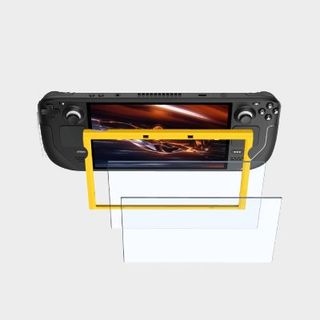
Design:Made of tempered glass that’s only 0.33mm thick, these Jsaux screen protectors are pretty unintrusive. In fact, they pretty much drop straight into the Steam Deck’s bezel space without protruding, which helps them feel like a natural part of the handheld. If you’ve ever tried to fit a generic option to something like the Nintendo Switch or your phone, you’ll know the pain of getting things align properly without bubbles, and that’s not something we experienced using this kit.
Features:With a 9H hardness rating and 99.99% transparency, Jsaux’s screen protectors will resist any scratches thrown at them while being almost invisible. As for fitting, the pack comes with a handy guiding frame that will ensure the protector is properly attached, which is perhaps why we were able to fit one to the Steam Deck without a hitch.
Performance:To see whether a Jsaux screen protector can actually live up to the company’s claims, I decided to virtually attack our sample with a variety of sharp tools. That’s not to say anyone would ever come at your handheld with a kitchen knife, but if they did, you can rest assured that the protector will shake off any damage with no marks. I even accidentally dropped my Deck during testing onto its face, and the tempered glass seemingly had my back.
Verdict:There are tons of different screen protector options out there, but we can attest to the fact that Jsaux’s kit will provide more than enough protection. A pack of two also costs less than a cup of coffee, meaning you won’t have to pay an upsetting amount for vital coverage.
Read more:Jsuax Screen Protector for Steam Deck review
The best Steam Deck dock
Image1of5(Image credit: Future / Phil Hayton)(Image credit: Future / Phil Hayton)(Image credit: Future / Phil Hayton)(Image credit: Future / Phil Hayton)(Image credit: Future / Phil Hayton)
Image1of5(Image credit: Future / Phil Hayton)(Image credit: Future / Phil Hayton)(Image credit: Future / Phil Hayton)(Image credit: Future / Phil Hayton)(Image credit: Future / Phil Hayton)
Image1of5
(Image credit: Future / Phil Hayton)(Image credit: Future / Phil Hayton)(Image credit: Future / Phil Hayton)(Image credit: Future / Phil Hayton)(Image credit: Future / Phil Hayton)
(Image credit: Future / Phil Hayton)(Image credit: Future / Phil Hayton)(Image credit: Future / Phil Hayton)(Image credit: Future / Phil Hayton)(Image credit: Future / Phil Hayton)
(Image credit: Future / Phil Hayton)
(Image credit: Future / Phil Hayton)
(Image credit: Future / Phil Hayton)
(Image credit: Future / Phil Hayton)
(Image credit: Future / Phil Hayton)
(Image credit: Future / Phil Hayton)
(Image credit: Future / Phil Hayton)
(Image credit: Future / Phil Hayton)
(Image credit: Future / Phil Hayton)
(Image credit: Future / Phil Hayton)
(Image credit: Future / Phil Hayton)
(Image credit: Future / Phil Hayton)
(Image credit: Future / Phil Hayton)
(Image credit: Future / Phil Hayton)
(Image credit: Future / Phil Hayton)
(Image credit: Future / Phil Hayton)
(Image credit: Future / Phil Hayton)
(Image credit: Future / Phil Hayton)
(Image credit: Future / Phil Hayton)
(Image credit: Future / Phil Hayton)
(Image credit: Future / Phil Hayton)
(Image credit: Future / Phil Hayton)
(Image credit: Future / Phil Hayton)
(Image credit: Future / Phil Hayton)
(Image credit: Future / Phil Hayton)
-
Baseus 6-in-1 Steam Deck dockThe best Steam Deck dockOur expert review:Average Amazon review:☆☆☆☆☆SpecificationsVideo output:1 x HDMI 2.0Ports:3 x USB A, 1 x USB-CEthernet:1000MBpsPower Delivery :100WToday’s Best DealsView at AmazonReasons to buy+Solid build quality+Adjustable cradle+Great designReasons to avoid-Front ports would be a nice extra
-
Baseus 6-in-1 Steam Deck dock
3. Baseus 6-in-1 Steam Deck dock
The best Steam Deck dock
Our expert review:Average Amazon review:☆☆☆☆☆
Our expert review:
Our expert review:
Average Amazon review:☆☆☆☆☆
Average Amazon review:☆☆☆☆☆
Average Amazon review:☆☆☆☆☆
Average Amazon review:☆☆☆☆☆
Average Amazon review:☆☆☆☆☆
☆☆☆☆☆
SpecificationsVideo output:1 x HDMI 2.0Ports:3 x USB A, 1 x USB-CEthernet:1000MBpsPower Delivery :100W
Video output:1 x HDMI 2.0Ports:3 x USB A, 1 x USB-CEthernet:1000MBpsPower Delivery :100W
Video output:1 x HDMI 2.0
Ports:3 x USB A, 1 x USB-C
Ethernet:1000MBps
Power Delivery :100W
Today’s Best DealsView at Amazon
Today’s Best DealsView at Amazon
Today’s Best DealsView at Amazon
Today’s Best DealsView at Amazon
Today’s Best Deals
View at Amazon
View at Amazon
View at Amazon
Reasons to buy+Solid build quality+Adjustable cradle+Great design
+Solid build quality+Adjustable cradle+Great design
Solid build quality
Adjustable cradle
Great design
Reasons to avoid-Front ports would be a nice extra
-Front ports would be a nice extra
Front ports would be a nice extra
We’ve tested a bunch of thebest Steam Deck dockcontenders, and the Baseus 6-in-1 punches harder than it’s competition. Not only will it easily hold your Deck with a case attached thanks to its adjustable cradle, but it also comes with a good selection of ports for hooking up to both desktop and living room setups.
Buy it if:✅ Your Steam Deck has a case:Unlike many other docking stations, Baseus' adjustable cradle can hold handhelds with a case or shell attached,✅ You care about build quality:The Baseus Steam Deck dock is solid, and its blend of metal and plastics feel pretty premium.✅ You use your Steam Deck at a desk:Small choices like keeping Ethernet round the back and the dock’s ability to fold down when not in use mean it’ll fit in nicely with most desk setups.
Buy it if:
✅ Your Steam Deck has a case:Unlike many other docking stations, Baseus' adjustable cradle can hold handhelds with a case or shell attached,✅ You care about build quality:The Baseus Steam Deck dock is solid, and its blend of metal and plastics feel pretty premium.✅ You use your Steam Deck at a desk:Small choices like keeping Ethernet round the back and the dock’s ability to fold down when not in use mean it’ll fit in nicely with most desk setups.
✅ Your Steam Deck has a case:Unlike many other docking stations, Baseus' adjustable cradle can hold handhelds with a case or shell attached,
✅ You care about build quality:The Baseus Steam Deck dock is solid, and its blend of metal and plastics feel pretty premium.
✅ You use your Steam Deck at a desk:Small choices like keeping Ethernet round the back and the dock’s ability to fold down when not in use mean it’ll fit in nicely with most desk setups.
Don’t buy it if:❌ You need DisplayPort:This dock only comes armed with HDMI, and if you’d rather not use an adapter, you’re better off looking something that better suits your display.❌ You want something cheaper:The Baseus Steam Deck dock isn’t the cheapest option out there, and there are alternatives that are normally available for less.
Don’t buy it if:
❌ You need DisplayPort:This dock only comes armed with HDMI, and if you’d rather not use an adapter, you’re better off looking something that better suits your display.❌ You want something cheaper:The Baseus Steam Deck dock isn’t the cheapest option out there, and there are alternatives that are normally available for less.
❌ You need DisplayPort:This dock only comes armed with HDMI, and if you’d rather not use an adapter, you’re better off looking something that better suits your display.
❌ You want something cheaper:The Baseus Steam Deck dock isn’t the cheapest option out there, and there are alternatives that are normally available for less.
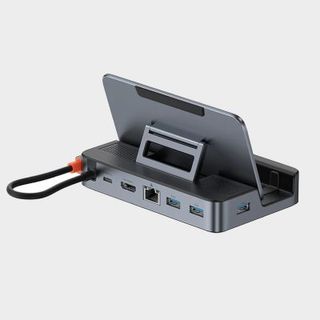
Design:Rather than sticking with a cradle specifically for the Deck, the Baseus 6-in-1 uses an almost deck-chair design that can be set at various angles and widths. This effectively means you won’t have to remove cases and shells when parking the portable, but also means chonkier handhelds like theAyaneo 2Sor even the likes of theAsus ROG Allyand the massiveLenovo Legion GO.
The rest of the dock is relatively standard, with most ports situated round the back of the device. As for built quality, Baseus has gone with a mix of durable plastic and rubber, and while you’d think that would feel less premium than aluminium, it somehow manages to feel more robust than other metal-clad alternatives out there.
Features:We’ve already touched on one of the Baseus 6-in-1’s biggest features, as its adjustable cradle incorporates functionality into its design. The rest of its traits relate to its port specs, with HDMI 2.0 providing a way to easily connect the Steam Deck to a TV or even a gaming monitor. You’ll also be able to make sure of three USB-A ports and Gigabit ethernet, enabling you to use Valve’s handheld at agaming deskwith a bunch of peripherals.
Performance:Just like all docking stations, the Baesus 6-in-1 won’t boost the Steam Deck’s performance. However, it does provide the handheld with a reliable way to connect to external screens, keep everything powered with 100W power delivery, and provide the portable with a steady perch. We’ve yet to encounter any glitches or connectivity hiccups when using this dock, and hooking up to USB-C has held up as a seamless experience.
Verdict:Out of all the docking stations out there for Steam Deck, the Baesus 6-in-1 feels like the most well-rounded option. There are cheaper add-ons that’ll provide a similar experience, but that adjustable cradle and its exceptional built quality help this one clinch the top spot.
Read more:Baseus 6-in-1 Steam Deck dock review
The best Steam Deck power bank
Image1of4(Image credit: Future / Phil Hayton)(Image credit: Future / Phil Hayton)(Image credit: Future / Phil Hayton)(Image credit: Future / Phil Hayton)
Image1of4(Image credit: Future / Phil Hayton)(Image credit: Future / Phil Hayton)(Image credit: Future / Phil Hayton)(Image credit: Future / Phil Hayton)
Image1of4
(Image credit: Future / Phil Hayton)(Image credit: Future / Phil Hayton)(Image credit: Future / Phil Hayton)(Image credit: Future / Phil Hayton)
(Image credit: Future / Phil Hayton)(Image credit: Future / Phil Hayton)(Image credit: Future / Phil Hayton)(Image credit: Future / Phil Hayton)
(Image credit: Future / Phil Hayton)
(Image credit: Future / Phil Hayton)
(Image credit: Future / Phil Hayton)
(Image credit: Future / Phil Hayton)
(Image credit: Future / Phil Hayton)
(Image credit: Future / Phil Hayton)
(Image credit: Future / Phil Hayton)
(Image credit: Future / Phil Hayton)
(Image credit: Future / Phil Hayton)
(Image credit: Future / Phil Hayton)
(Image credit: Future / Phil Hayton)
(Image credit: Future / Phil Hayton)
(Image credit: Future / Phil Hayton)
(Image credit: Future / Phil Hayton)
(Image credit: Future / Phil Hayton)
(Image credit: Future / Phil Hayton)
(Image credit: Future / Phil Hayton)
(Image credit: Future / Phil Hayton)
(Image credit: Future / Phil Hayton)
(Image credit: Future / Phil Hayton)
-
Jsaux 20000mAh 65wThe best Steam Deck power bankOur expert review:Average Amazon review:☆☆☆☆☆SpecificationsPower:65WCapacity:20,000mAhPorts:1x USB-C, 2 x USB-AToday’s Best DealsView at AmazonView at AmazonReasons to buy+Large 20,000mAh capacity+Pairs nicely with Steam Deck+Compact designReasons to avoid-Main USB-C cable isn’t removable
-
Jsaux 20000mAh 65w
4. Jsaux 20000mAh 65w
The best Steam Deck power bank
Our expert review:Average Amazon review:☆☆☆☆☆
Our expert review:
Our expert review:
Average Amazon review:☆☆☆☆☆
Average Amazon review:☆☆☆☆☆
Average Amazon review:☆☆☆☆☆
Average Amazon review:☆☆☆☆☆
Average Amazon review:☆☆☆☆☆
☆☆☆☆☆
SpecificationsPower:65WCapacity:20,000mAhPorts:1x USB-C, 2 x USB-A
Power:65WCapacity:20,000mAhPorts:1x USB-C, 2 x USB-A
Power:65W
Capacity:20,000mAh
Ports:1x USB-C, 2 x USB-A
Today’s Best DealsView at AmazonView at Amazon
Today’s Best DealsView at AmazonView at Amazon
Today’s Best DealsView at AmazonView at Amazon
Today’s Best DealsView at AmazonView at Amazon
Today’s Best Deals
View at AmazonView at Amazon
View at Amazon
View at Amazon
View at Amazon
View at Amazon
Reasons to buy+Large 20,000mAh capacity+Pairs nicely with Steam Deck+Compact design
+Large 20,000mAh capacity+Pairs nicely with Steam Deck+Compact design
Large 20,000mAh capacity
Pairs nicely with Steam Deck
Compact design
Reasons to avoid-Main USB-C cable isn’t removable
-Main USB-C cable isn’t removable
Main USB-C cable isn’t removable
There’s no shortage of power banks on the market, but it’s clear that the Jsaux 20000mAh 65w was created with handhelds like the Steam Deck in mind. Not only will it provide more than enough juice to keep your portable charged for an extended period, but it’ll even fit onto cases like the ModCase for maximum compatibility.
Buy it if:✅ You want something portable:Jsaux’s power bank is made specifically with the Steam Deck in mind, and it’s small enough to strap to its back.✅ You need a long battery life:If you know you’re going to be away from a power outlet for a while, this is the power bank you’ll need.
Buy it if:
✅ You want something portable:Jsaux’s power bank is made specifically with the Steam Deck in mind, and it’s small enough to strap to its back.✅ You need a long battery life:If you know you’re going to be away from a power outlet for a while, this is the power bank you’ll need.
✅ You want something portable:Jsaux’s power bank is made specifically with the Steam Deck in mind, and it’s small enough to strap to its back.
✅ You need a long battery life:If you know you’re going to be away from a power outlet for a while, this is the power bank you’ll need.
Don’t buy it if:❌ You want to use peripherals:You might benefit from a higher wattage than 65W if you want to power more than just the Steam Deck.❌ You need more ports:This specific power bank keeps things trim with only a few ports at the top.
Don’t buy it if:
❌ You want to use peripherals:You might benefit from a higher wattage than 65W if you want to power more than just the Steam Deck.❌ You need more ports:This specific power bank keeps things trim with only a few ports at the top.
❌ You want to use peripherals:You might benefit from a higher wattage than 65W if you want to power more than just the Steam Deck.
❌ You need more ports:This specific power bank keeps things trim with only a few ports at the top.
Design:Unlike some 20,000mAh options, Jsaux’s 65W power bank is pretty slimline. That means it’ll fit into your backpack with no issues, but also provides you with the option of using something like the company’s own ModCase to attach it to the back of the Steam Deck. Doing so will minimise the amount of peripherals you have lying around on your travels, which is incredibly handy if you’re on a plane and only have one of those little tables.
Features:One the front, the Jsaux’s bank has a tiny screen that displays vital information like charge time, capacity and voltage. A handy extra for those of you who get nerdy about stats, but it’ll also help you work out what you can realistically keep powered up on the go. It’s also got a built-in USB-C cable, and while we’d rather it was removable, it will save you from misplacing your own and not being able to charge up your Deck.
Verdict:Admittedly, there are power banks out there that boast a greater capacity and wattage,. But, when it comes to Steam Deck, this Jsaux option strikes a better balance between specs and portability.
Read more:Jsaux 20000mAh 65w review
The best Steam Deck controller
Image1of5(Image credit: Future / Duncan Robertson)(Image credit: Future / Duncan Robertson)(Image credit: Future / Duncan Robertson)(Image credit: Future / Duncan Robertson)(Image credit: Future / Duncan Robertson)
Image1of5(Image credit: Future / Duncan Robertson)(Image credit: Future / Duncan Robertson)(Image credit: Future / Duncan Robertson)(Image credit: Future / Duncan Robertson)(Image credit: Future / Duncan Robertson)
Image1of5
(Image credit: Future / Duncan Robertson)(Image credit: Future / Duncan Robertson)(Image credit: Future / Duncan Robertson)(Image credit: Future / Duncan Robertson)(Image credit: Future / Duncan Robertson)
(Image credit: Future / Duncan Robertson)(Image credit: Future / Duncan Robertson)(Image credit: Future / Duncan Robertson)(Image credit: Future / Duncan Robertson)(Image credit: Future / Duncan Robertson)
(Image credit: Future / Duncan Robertson)
(Image credit: Future / Duncan Robertson)
(Image credit: Future / Duncan Robertson)
(Image credit: Future / Duncan Robertson)
(Image credit: Future / Duncan Robertson)
(Image credit: Future / Duncan Robertson)
(Image credit: Future / Duncan Robertson)
(Image credit: Future / Duncan Robertson)
(Image credit: Future / Duncan Robertson)
(Image credit: Future / Duncan Robertson)
(Image credit: Future / Duncan Robertson)
(Image credit: Future / Duncan Robertson)
(Image credit: Future / Duncan Robertson)
(Image credit: Future / Duncan Robertson)
(Image credit: Future / Duncan Robertson)
(Image credit: Future / Duncan Robertson)
(Image credit: Future / Duncan Robertson)
(Image credit: Future / Duncan Robertson)
(Image credit: Future / Duncan Robertson)
(Image credit: Future / Duncan Robertson)
(Image credit: Future / Duncan Robertson)
(Image credit: Future / Duncan Robertson)
(Image credit: Future / Duncan Robertson)
(Image credit: Future / Duncan Robertson)
(Image credit: Future / Duncan Robertson)
-
Asus ROG Raikiri ProThe best Steam Deck controllerOur expert review:SpecificationsConnectivity:2.4Ghz wireless, Bluetooth, USB-CButtons:16Cable:3mWeight:330g (including cable)Today’s Best DealsView at AmazonView at Best BuyView at AmazonReasons to buy+Beautiful aesthetics+Conclusive PC customization software+Could be great in smaller handsReasons to avoid-OLED screen could do more-Can’t wirelessly connect to Xbox
-
Asus ROG Raikiri Pro
5. Asus ROG Raikiri Pro
The best Steam Deck controller
Our expert review:
Our expert review:
Our expert review:
SpecificationsConnectivity:2.4Ghz wireless, Bluetooth, USB-CButtons:16Cable:3mWeight:330g (including cable)
Connectivity:2.4Ghz wireless, Bluetooth, USB-CButtons:16Cable:3mWeight:330g (including cable)
Connectivity:2.4Ghz wireless, Bluetooth, USB-C
Buttons:16
Cable:3m
Weight:330g (including cable)
Today’s Best DealsView at AmazonView at Best BuyView at Amazon
Today’s Best DealsView at AmazonView at Best BuyView at Amazon
Today’s Best DealsView at AmazonView at Best BuyView at Amazon
Today’s Best DealsView at AmazonView at Best BuyView at Amazon
Today’s Best Deals
View at AmazonView at Best BuyView at Amazon
View at Amazon
View at Amazon
View at Best Buy
View at Best Buy
View at Amazon
View at Amazon
Reasons to buy+Beautiful aesthetics+Conclusive PC customization software+Could be great in smaller hands
+Beautiful aesthetics+Conclusive PC customization software+Could be great in smaller hands
Beautiful aesthetics
Conclusive PC customization software
Could be great in smaller hands
Reasons to avoid-OLED screen could do more-Can’t wirelessly connect to Xbox
-OLED screen could do more-Can’t wirelessly connect to Xbox
OLED screen could do more
Can’t wirelessly connect to Xbox
Not everyone in the GamesRadar+ hardware team vibes with what the Asus ROG Raikiri Prohas to offer as aPC controller. However, the fact it wields 2.4Ghz and Bluetooth while also offering up pro controller features and a great aesthetic makes it a strong option for Steam Deck setups.
Buy it if:✅ You want Bluetooth and 2.4Ghz:This pad can provide both wireless options alongside a wired connection, and you can seamlessly hop from one option to the other using the built-in OLED screen.✅ You want good battery life:Clocking in at around 48 hours, this controller can handle long play sessions.
Buy it if:
✅ You want Bluetooth and 2.4Ghz:This pad can provide both wireless options alongside a wired connection, and you can seamlessly hop from one option to the other using the built-in OLED screen.✅ You want good battery life:Clocking in at around 48 hours, this controller can handle long play sessions.
✅ You want Bluetooth and 2.4Ghz:This pad can provide both wireless options alongside a wired connection, and you can seamlessly hop from one option to the other using the built-in OLED screen.
✅ You want good battery life:Clocking in at around 48 hours, this controller can handle long play sessions.
Don’t buy it if:❌ You care about back buttons:This controller’s additional buttons won’t be suited to everyone’s hands❌ You have big hands:Asus' pad is on the small side, which might make it hard for big palms to grip.
Don’t buy it if:
❌ You care about back buttons:This controller’s additional buttons won’t be suited to everyone’s hands❌ You have big hands:Asus' pad is on the small side, which might make it hard for big palms to grip.
❌ You care about back buttons:This controller’s additional buttons won’t be suited to everyone’s hands
❌ You have big hands:Asus' pad is on the small side, which might make it hard for big palms to grip.
As for ergonomics, the pad feels pretty similar to an Xbox controller in the hands. Your milage may vary based on your preferences and the size of your mitts, but the controller offers up comfortable access to its face buttons, sticks, and triggers. The additional back buttons are a tad small compared to some options out there, so keep that in mind if you rely on extra inputs.
Features:Once again, we’ve spoiled some of the core perks of this controller when chatting design. But, there are a couple of pro controller extras, like trigger locks that can be further customised with Asus' Armoury Crate software. You’ll also be able to set profiles that can be accessed using the aforementioned OLED screen, which might be handy if you need a different setup when using the Steam Deck.
Performance:In testing specifically with the Steam Deck, the Raikiri Pro’s 48 hour batter promises held up. The controller is also able to reliably jump back and forth from using Bluetooth to 2.4Ghz wireless without any fuss, which is extremely handy if you want to either share the pad between devices. Connectivity also remained strong over both wireless methods, whereas Bluetooth stability can be shaky when using alternatives like the official Xbox Wireless controller.
Verdict:It’s needless to say that the Raikiri Pro is far from perfect, but when it comes to providing the Steam Deck with connectivity options and comfortable external controls, this pad gets a lot right.Read more:Asus ROG Raikiri Pro review
The best Steam Deck charger
Image1of5(Image credit: Future / Phil Hayton)(Image credit: Future / Phil Hayton)(Image credit: Future / Phil Hayton)(Image credit: Future / Phil Hayton)(Image credit: Future / Phil Hayton)
Image1of5(Image credit: Future / Phil Hayton)(Image credit: Future / Phil Hayton)(Image credit: Future / Phil Hayton)(Image credit: Future / Phil Hayton)(Image credit: Future / Phil Hayton)
Image1of5
(Image credit: Future / Phil Hayton)(Image credit: Future / Phil Hayton)(Image credit: Future / Phil Hayton)(Image credit: Future / Phil Hayton)(Image credit: Future / Phil Hayton)
(Image credit: Future / Phil Hayton)(Image credit: Future / Phil Hayton)(Image credit: Future / Phil Hayton)(Image credit: Future / Phil Hayton)(Image credit: Future / Phil Hayton)
(Image credit: Future / Phil Hayton)
(Image credit: Future / Phil Hayton)
(Image credit: Future / Phil Hayton)
(Image credit: Future / Phil Hayton)
(Image credit: Future / Phil Hayton)
(Image credit: Future / Phil Hayton)
(Image credit: Future / Phil Hayton)
(Image credit: Future / Phil Hayton)
(Image credit: Future / Phil Hayton)
(Image credit: Future / Phil Hayton)
(Image credit: Future / Phil Hayton)
(Image credit: Future / Phil Hayton)
(Image credit: Future / Phil Hayton)
(Image credit: Future / Phil Hayton)
(Image credit: Future / Phil Hayton)
(Image credit: Future / Phil Hayton)
(Image credit: Future / Phil Hayton)
(Image credit: Future / Phil Hayton)
(Image credit: Future / Phil Hayton)
(Image credit: Future / Phil Hayton)
(Image credit: Future / Phil Hayton)
(Image credit: Future / Phil Hayton)
(Image credit: Future / Phil Hayton)
(Image credit: Future / Phil Hayton)
(Image credit: Future / Phil Hayton)
-
Acefast Power Station Z4The best Steam Deck chargerOur expert review:Average Amazon review:☆☆☆☆☆SpecificationsPower:Up to 218WPorts:3 x USB-C, 1x USB-AToday’s Best DealsCheck AmazonReasons to buy+218W total power+Versatile charging modes+Built-in TFT screen+CompactReasons to avoid-Doesn’t include cables-Pricey
-
Acefast Power Station Z4
6. Acefast Power Station Z4
The best Steam Deck charger
Our expert review:Average Amazon review:☆☆☆☆☆
Our expert review:
Our expert review:
Average Amazon review:☆☆☆☆☆
Average Amazon review:☆☆☆☆☆
Average Amazon review:☆☆☆☆☆
Average Amazon review:☆☆☆☆☆
Average Amazon review:☆☆☆☆☆
☆☆☆☆☆
SpecificationsPower:Up to 218WPorts:3 x USB-C, 1x USB-A
Power:Up to 218WPorts:3 x USB-C, 1x USB-A
Power:Up to 218W
Ports:3 x USB-C, 1x USB-A
Today’s Best DealsCheck Amazon
Today’s Best DealsCheck Amazon
Today’s Best DealsCheck Amazon
Today’s Best DealsCheck Amazon
Today’s Best Deals
Check Amazon
Check Amazon
Check Amazon
Reasons to buy+218W total power+Versatile charging modes+Built-in TFT screen+Compact
+218W total power+Versatile charging modes+Built-in TFT screen+Compact
218W total power
Versatile charging modes
Built-in TFT screen
Compact
Reasons to avoid-Doesn’t include cables-Pricey
-Doesn’t include cables-Pricey
Doesn’t include cables
Pricey
The Steam Deck may come with a charger, but the Acefast Power Station Z4 will charge the handheld and all its accessories without breaking a sweat. The 218W GaN hub has more than enough oomph to deal with the portable PC and fast charge three other devices, saving you from dealing with a mess of cables when charging everything up.
Buy it if:✅ You’ve got lots of devices:If you routinely need to charge you Steam Deck and all its accessories at home, this all-in-one hub is a game changer.✅ You want something compact:The Z4 will take up less space on your desk than a sandwich, all while delivering a total of 218W to devices.
Buy it if:
✅ You’ve got lots of devices:If you routinely need to charge you Steam Deck and all its accessories at home, this all-in-one hub is a game changer.✅ You want something compact:The Z4 will take up less space on your desk than a sandwich, all while delivering a total of 218W to devices.
✅ You’ve got lots of devices:If you routinely need to charge you Steam Deck and all its accessories at home, this all-in-one hub is a game changer.
✅ You want something compact:The Z4 will take up less space on your desk than a sandwich, all while delivering a total of 218W to devices.
Don’t buy it if:❌ You want something portable:If you usually charge your handheld and gadgets on the go, a power bank might be more suitable.❌ You’d rather just use separate chargers:If you’re happy using each device’s included adapter, you won’t benefit from picking this hub up.
Don’t buy it if:
❌ You want something portable:If you usually charge your handheld and gadgets on the go, a power bank might be more suitable.❌ You’d rather just use separate chargers:If you’re happy using each device’s included adapter, you won’t benefit from picking this hub up.
❌ You want something portable:If you usually charge your handheld and gadgets on the go, a power bank might be more suitable.
❌ You’d rather just use separate chargers:If you’re happy using each device’s included adapter, you won’t benefit from picking this hub up.
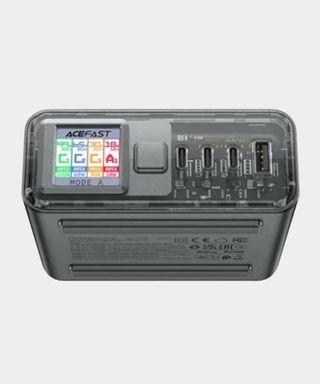
Features:Thanks to the power of GaN (Gallium Nitrate) technology, the Acefast Power Station Z4 takes up minimal space on your desk while delivering exceptional power to all of your devices, including the Steam Deck. It can satiate the portable’s 45W requirements and still have plenty of capacity to charge another handheld and any accessory you can throw at it, and you can select from various power modes to deliver specific power to each.
Design:While the Z4 is designed to be discrete, it’s also pretty attractive to look at thanks to its tiny TFT color screen and transparent front plate. The overall aesthetic is subtle yet stylish, maintaining understated flare while ensuring it doesn’t dominate your space. Despite its size, it also has enough heft to keep itself from skating across your desk when you move cables, something that helps it achieve a premium vibe that matches it price tag.
Performance:We’ve tested the Z4 using the Steam Deck OLED, other handhelds like theAyaneo Flip DS, and various accessories like earbuds. The result? The hub charged everything we could throw at it while embracing fast charging where available. Being able to switch specific ports to output 100W means it’ll also supply juice to gaming laptops with Power Delivery ports, meaning it’ll effectively work with any device with USB-C ports.
Verdict:The Power Station Z4 is admittedly pricey, and the fact it doesn’t at least supply a few cables is a bummer. That said, it’s also an incredibly versatile charger for the Steam Deck and any other gadget you may have to hand, providing a clutter free experience even with four devices hooked up at once.
Read more:Acefast Power Station Z4 review
The best Steam Deck headset
Image1of3(Image credit: Future)(Image credit: Future)(Image credit: Future)
Image1of3(Image credit: Future)(Image credit: Future)(Image credit: Future)
Image1of3
(Image credit: Future)(Image credit: Future)(Image credit: Future)
(Image credit: Future)(Image credit: Future)(Image credit: Future)
(Image credit: Future)
(Image credit: Future)
(Image credit: Future)
(Image credit: Future)
(Image credit: Future)
(Image credit: Future)
(Image credit: Future)
(Image credit: Future)
(Image credit: Future)
(Image credit: Future)
(Image credit: Future)
(Image credit: Future)
(Image credit: Future)
(Image credit: Future)
(Image credit: Future)
-
Razer Barracuda X (2022)The best Steam Deck headsetOur expert review:SpecificationsAcoustic design:Closed backCable length:1.5mDrivers:40mm Razer TriforceWeight:250gCompatibility:Nintendo Switch, PC, Mac, PS5, PS4, Xbox Series X, Xbox One, Android mobileToday’s Best DealsView at Best BuyView at AmazonView at RazerReasons to buy+Excellent audio quality+Wireless+USB-C connection+Great valueReasons to avoid-Limited to Razer Audio app settings
-
Razer Barracuda X (2022)
7. Razer Barracuda X (2022)
The best Steam Deck headset
Our expert review:
Our expert review:
Our expert review:
SpecificationsAcoustic design:Closed backCable length:1.5mDrivers:40mm Razer TriforceWeight:250gCompatibility:Nintendo Switch, PC, Mac, PS5, PS4, Xbox Series X, Xbox One, Android mobile
Acoustic design:Closed backCable length:1.5mDrivers:40mm Razer TriforceWeight:250gCompatibility:Nintendo Switch, PC, Mac, PS5, PS4, Xbox Series X, Xbox One, Android mobile
Acoustic design:Closed back
Cable length:1.5m
Drivers:40mm Razer Triforce
Weight:250g
Compatibility:Nintendo Switch, PC, Mac, PS5, PS4, Xbox Series X, Xbox One, Android mobile
Today’s Best DealsView at Best BuyView at AmazonView at Razer
Today’s Best DealsView at Best BuyView at AmazonView at Razer
Today’s Best DealsView at Best BuyView at AmazonView at Razer
Today’s Best DealsView at Best BuyView at AmazonView at Razer
Today’s Best Deals
View at Best BuyView at AmazonView at Razer
View at Best Buy
View at Best Buy
View at Amazon
View at Amazon
View at Razer
View at Razer
Reasons to buy+Excellent audio quality+Wireless+USB-C connection+Great value
+Excellent audio quality+Wireless+USB-C connection+Great value
Excellent audio quality
Wireless
USB-C connection
Great value
Reasons to avoid-Limited to Razer Audio app settings
-Limited to Razer Audio app settings
Limited to Razer Audio app settings
Buy it if:✅ You play in handheld mode on the go:This is where the Razer Barracuda X is most at home. With its comfort, ease of wireless connection, and excellent battery life, it’s the perfect headset to take on the road.✅ Portability is a big factor for your commute:That Bluetooth connection, subtle form factor, and swivel design (as well as the audio’s performance in music and podcasts) means the Barracuda X can easily double up as a pair of commuter headphones.✅ EQ settings don’t interest you:If you don’t want all the faff of setting up the perfect equalizer balance, the plug and play nature of the Barracuda X is perfect. Of course, you can still quickly tweak in the mobile app - but there’s no intimidating dials and levels to concern yourself with here.
Buy it if:
✅ You play in handheld mode on the go:This is where the Razer Barracuda X is most at home. With its comfort, ease of wireless connection, and excellent battery life, it’s the perfect headset to take on the road.✅ Portability is a big factor for your commute:That Bluetooth connection, subtle form factor, and swivel design (as well as the audio’s performance in music and podcasts) means the Barracuda X can easily double up as a pair of commuter headphones.✅ EQ settings don’t interest you:If you don’t want all the faff of setting up the perfect equalizer balance, the plug and play nature of the Barracuda X is perfect. Of course, you can still quickly tweak in the mobile app - but there’s no intimidating dials and levels to concern yourself with here.
✅ You play in handheld mode on the go:This is where the Razer Barracuda X is most at home. With its comfort, ease of wireless connection, and excellent battery life, it’s the perfect headset to take on the road.
✅ Portability is a big factor for your commute:That Bluetooth connection, subtle form factor, and swivel design (as well as the audio’s performance in music and podcasts) means the Barracuda X can easily double up as a pair of commuter headphones.
✅ EQ settings don’t interest you:If you don’t want all the faff of setting up the perfect equalizer balance, the plug and play nature of the Barracuda X is perfect. Of course, you can still quickly tweak in the mobile app - but there’s no intimidating dials and levels to concern yourself with here.
Don’t buy it if:❌ Software support is important:If you do want to tinker with your audio balance, the Razer Audio app is restricted compared to Synapse. The Barracuda X doesn’t support Synapse 3, so you are stuck with a watered down set of controls.❌ You want to fall back on a wired connection:The wired connection isn’t powered, so we noticed a significant drop in quality when bringing a cable in to play.
Don’t buy it if:
❌ Software support is important:If you do want to tinker with your audio balance, the Razer Audio app is restricted compared to Synapse. The Barracuda X doesn’t support Synapse 3, so you are stuck with a watered down set of controls.❌ You want to fall back on a wired connection:The wired connection isn’t powered, so we noticed a significant drop in quality when bringing a cable in to play.
❌ Software support is important:If you do want to tinker with your audio balance, the Razer Audio app is restricted compared to Synapse. The Barracuda X doesn’t support Synapse 3, so you are stuck with a watered down set of controls.
❌ You want to fall back on a wired connection:The wired connection isn’t powered, so we noticed a significant drop in quality when bringing a cable in to play.
Design:Unlike some gaming PC headsets out there, the Razer Barracuda X looks far less like a peripheral and more like fashionable tech. That’s something that’ll make all the difference if you want to use them when on a train or within view of the public, as no one want to look like John Madden just so they can hear their games. In terms of comfort, lightweight plastic and breathable memory foam cushioning will prevent the Barracuda from weighing down your noggin, and all the buttons and ports are easily accessible from the left hand cup.
Features:The Barracuda X is a jack of all trades, dishing out 2.4Ghz, Bluetooth, and wired connectivity. All three will benefit Steam Deck users, as the included dongle can hook up to your docking station while Bluetooth and 3.5mm jack options accompany you outside. Being able to do all three also means this headset will work with virtually any system, whether you’re looking for Nintendo Switch accessories or an audio upgrade for PS5 and Xbox Series X.
Performance:In terms of fidelity, the Barracuda X provides a rich, well-balanced profile with equal attention to mids, bass, and treble. All three combine to produce a surprisingly sophisticated sound signature, resulting in one of the best audio solutions we’ve tested for under $100. Battery life also holds up pretty well too, with a 50+ hour runtime helping cut the cord for longer while you galivant with the Steam Deck in hand.
Verdict:There are plenty ofbest Steam Deck headsetcontenders to consider out there, but the Razer Barracuda X is the one we’d reach for if heading out for the day with Valve’s handheld. Keep in mind if you opt for this set of cans, you’ll effectively have headphones you can use across every platform at home and in your backpack.
Read more:Razer Barracuda X (2022) review
The best Steam Deck keyboard
Image1of5(Image credit: Future)(Image credit: Future)(Image credit: Future)(Image credit: Future)(Image credit: Future)
Image1of5(Image credit: Future)(Image credit: Future)(Image credit: Future)(Image credit: Future)(Image credit: Future)
Image1of5
(Image credit: Future)(Image credit: Future)(Image credit: Future)(Image credit: Future)(Image credit: Future)
(Image credit: Future)(Image credit: Future)(Image credit: Future)(Image credit: Future)(Image credit: Future)
(Image credit: Future)
(Image credit: Future)
(Image credit: Future)
(Image credit: Future)
(Image credit: Future)
(Image credit: Future)
(Image credit: Future)
(Image credit: Future)
(Image credit: Future)
(Image credit: Future)
(Image credit: Future)
(Image credit: Future)
(Image credit: Future)
(Image credit: Future)
(Image credit: Future)
(Image credit: Future)
(Image credit: Future)
(Image credit: Future)
(Image credit: Future)
(Image credit: Future)
(Image credit: Future)
(Image credit: Future)
(Image credit: Future)
(Image credit: Future)
(Image credit: Future)
-
Cherry MX-LP 2.1The best Steam Deck keyboardOur expert review:SpecificationsType:MechanicalConnection:2.4GHz / Bluetooth / WiredSwitches:Cherry MX Low ProfileKeycaps:ABSMedia keys:dual-function onlyWrist wrest:NoUSB passthrough:NoToday’s Best DealsView at AmazonReasons to buy+Slick, compact design+Featherlight but durable construction+Super speedy switches+Smooth, soft keycaps+Vivid aesthetic+Excellent connectivity optionsReasons to avoid-Not ergonomic enough for longer typing sessions-65% means fewer onboard controls-PBT keycaps would have been nice at this price point
-
Cherry MX-LP 2.1
8. Cherry MX-LP 2.1
The best Steam Deck keyboard
Our expert review:
Our expert review:
Our expert review:
SpecificationsType:MechanicalConnection:2.4GHz / Bluetooth / WiredSwitches:Cherry MX Low ProfileKeycaps:ABSMedia keys:dual-function onlyWrist wrest:NoUSB passthrough:No
Type:MechanicalConnection:2.4GHz / Bluetooth / WiredSwitches:Cherry MX Low ProfileKeycaps:ABSMedia keys:dual-function onlyWrist wrest:NoUSB passthrough:No
Type:Mechanical
Connection:2.4GHz / Bluetooth / Wired
Switches:Cherry MX Low Profile
Keycaps:ABS
Media keys:dual-function only
Wrist wrest:No
USB passthrough:No
Today’s Best DealsView at Amazon
Today’s Best DealsView at Amazon
Today’s Best DealsView at Amazon
Today’s Best DealsView at Amazon
Today’s Best Deals
View at Amazon
View at Amazon
View at Amazon
Reasons to buy+Slick, compact design+Featherlight but durable construction+Super speedy switches+Smooth, soft keycaps+Vivid aesthetic+Excellent connectivity options
+Slick, compact design+Featherlight but durable construction+Super speedy switches+Smooth, soft keycaps+Vivid aesthetic+Excellent connectivity options
Slick, compact design
Featherlight but durable construction
Super speedy switches
Smooth, soft keycaps
Vivid aesthetic
Excellent connectivity options
Reasons to avoid-Not ergonomic enough for longer typing sessions-65% means fewer onboard controls-PBT keycaps would have been nice at this price point
-Not ergonomic enough for longer typing sessions-65% means fewer onboard controls-PBT keycaps would have been nice at this price point
Not ergonomic enough for longer typing sessions
65% means fewer onboard controls
PBT keycaps would have been nice at this price point
You don’thaveto pair the Steam Deck with a smaller keyboard, but options like the Cherry MX-LP 2.1 are endlessly portable. You won’t even have to worry about compromises as this mechanical keeb packs the company’s MX Low Profile switches into a 65% package alongside a hearty selection of connectivity options.
Buy it if✅ You need something compact:The MX-LP 2.1 is one of the most portable mechanical keyboards we’ve tested, offering up everything you’d need in a much smaller footprint.✅You use Desktop Mode regularly:Rather than trying to use Valve’s on-screen keyboard, you’d be much better off using something that exists in the physical realm.✅You only use mechanical:This keyboard uses Cherry MX, and they provide one of the best typing experiences around.
Buy it if
✅ You need something compact:The MX-LP 2.1 is one of the most portable mechanical keyboards we’ve tested, offering up everything you’d need in a much smaller footprint.✅You use Desktop Mode regularly:Rather than trying to use Valve’s on-screen keyboard, you’d be much better off using something that exists in the physical realm.✅You only use mechanical:This keyboard uses Cherry MX, and they provide one of the best typing experiences around.
✅ You need something compact:The MX-LP 2.1 is one of the most portable mechanical keyboards we’ve tested, offering up everything you’d need in a much smaller footprint.
✅You use Desktop Mode regularly:Rather than trying to use Valve’s on-screen keyboard, you’d be much better off using something that exists in the physical realm.
✅You only use mechanical:This keyboard uses Cherry MX, and they provide one of the best typing experiences around.
Don’t buy it if❌ You care about ergonomics:We wouldn’t advise writing a whole novel with this keyboard, as its smaller design doesn’t hold up in longer sessions.❌You need more on-board controls:Due to the keyboard’s size, functionality is somewhat reduced compared to conventional models.
Don’t buy it if
❌ You care about ergonomics:We wouldn’t advise writing a whole novel with this keyboard, as its smaller design doesn’t hold up in longer sessions.❌You need more on-board controls:Due to the keyboard’s size, functionality is somewhat reduced compared to conventional models.
❌ You care about ergonomics:We wouldn’t advise writing a whole novel with this keyboard, as its smaller design doesn’t hold up in longer sessions.
❌You need more on-board controls:Due to the keyboard’s size, functionality is somewhat reduced compared to conventional models.
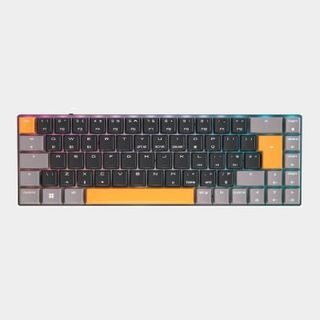
Design:As far as 65% options go, the Cherry MX-LP 2.1 is one of thebest gaming keyboardswhen it comes to looks. That’s largely thanks to its vivid choice of cap colors, with orange accents contributing to a vibe that feels very Valve Orange Box-chic. aesthetics aside, it’s also super light, weighing in at just 423g thanks to its choice of layout.
Features:Armed with Cherry Low Profile Speed switches, the MX-LP 2.1 will provide a swift and accurate typing experience. The keyboard maker’s choice of ABS caps this time are also super smooth and soft, even though we’d have preferred PBT keycaps at this price point. As for connectivity, you won’t remotely be stuck for options, with 2.4Ghz, Bluetooth, and USB-C all providing a way to hook up directly to the Steam Deck and docking stations.
Performance:Despite featuring a lower profile and reduced footprint, the MX-LP 2.1 provides a fluid typing experience. Each cap provides a nice level of resistance and avoids any key wobble or reverb. Cherry’s soft keycap and switch combo also makes for a smooth experience in games, with frantic adventures like Alan Wake and more complex outings like Elder Scrolls Online holding up great. Naturally, it’ll also provide reliable results when tapping away in SteamOS' Desktop Mode, which is vital when it comes to the handheld’s hybrid capabilities.
Verdict:If you’re looking for a keeb that takes up as little room as possible at your Steam Deck setup without caveats, the Cherry MX-LP 2.1 has your back. There are natural compromises tied to it being 65%, but you could argue full blown layouts are just as much of a hindrance when it comes to using them with a handheld.
Read more:Cherry MX-LP 2.1 review
The best Steam Deck mouse
Image1of4(Image credit: Razer)(Image credit: Razer)(Image credit: Razer)(Image credit: Razer)
Image1of4(Image credit: Razer)(Image credit: Razer)(Image credit: Razer)(Image credit: Razer)
Image1of4
(Image credit: Razer)(Image credit: Razer)(Image credit: Razer)(Image credit: Razer)
(Image credit: Razer)(Image credit: Razer)(Image credit: Razer)(Image credit: Razer)
(Image credit: Razer)
(Image credit: Razer)
(Image credit: Razer)
(Image credit: Razer)
(Image credit: Razer)
(Image credit: Razer)
(Image credit: Razer)
(Image credit: Razer)
(Image credit: Razer)
(Image credit: Razer)
(Image credit: Razer)
(Image credit: Razer)
(Image credit: Razer)
(Image credit: Razer)
(Image credit: Razer)
(Image credit: Razer)
(Image credit: Razer)
(Image credit: Razer)
(Image credit: Razer)
(Image credit: Razer)
-
Razer Orochi V2The best Steam Deck mouseOur expert review:SpecificationsConnectivity:Wireless (HyperSpeed 2.4GHz, Bluetooth)Shape:AmbidextrousButtons:6DPI:18,000IPS:Up to 450Switches:Razer Mechanical (2nd-gen)Weight:65gToday’s Best DealsView at AmazonView at WalmartView at RazerReasons to buy+Sharp, satisfying clicks+Superb battery life+Smart designReasons to avoid-Not perfect for all grip types-Awkward scroll wheel click
-
Razer Orochi V2
9. Razer Orochi V2
The best Steam Deck mouse
Our expert review:
Our expert review:
Our expert review:
SpecificationsConnectivity:Wireless (HyperSpeed 2.4GHz, Bluetooth)Shape:AmbidextrousButtons:6DPI:18,000IPS:Up to 450Switches:Razer Mechanical (2nd-gen)Weight:65g
Connectivity:Wireless (HyperSpeed 2.4GHz, Bluetooth)Shape:AmbidextrousButtons:6DPI:18,000IPS:Up to 450Switches:Razer Mechanical (2nd-gen)Weight:65g
Connectivity:Wireless (HyperSpeed 2.4GHz, Bluetooth)
Shape:Ambidextrous
Buttons:6
DPI:18,000
IPS:Up to 450
Switches:Razer Mechanical (2nd-gen)
Weight:65g
Today’s Best DealsView at AmazonView at WalmartView at Razer
Today’s Best DealsView at AmazonView at WalmartView at Razer
Today’s Best DealsView at AmazonView at WalmartView at Razer
Today’s Best DealsView at AmazonView at WalmartView at Razer
Today’s Best Deals
View at AmazonView at WalmartView at Razer
View at Amazon
View at Amazon
View at Walmart
View at Walmart
View at Razer
View at Razer
Reasons to buy+Sharp, satisfying clicks+Superb battery life+Smart design
+Sharp, satisfying clicks+Superb battery life+Smart design
Sharp, satisfying clicks
Superb battery life
Smart design
Reasons to avoid-Not perfect for all grip types-Awkward scroll wheel click
-Not perfect for all grip types-Awkward scroll wheel click
Not perfect for all grip types
Awkward scroll wheel click
Look, the Razer Orochi V2 is absolutely going to lose a fight with most of thebest gaming mouseoptions out there. That is until it comes to on the go performance, as this clicker pulls a fantastic portable punch for well under $100 / £100.
But it if:✅You need exceptional battery life:This mouse can keep going in Bluetooth mode for up to 950 hours, so you won’t have to swap batteries often.✅You want something small:The Orochi V2 is fairly dinky, so squeezing it into your Steam Deck backpack shouldn’t be an issue.
But it if:
✅You need exceptional battery life:This mouse can keep going in Bluetooth mode for up to 950 hours, so you won’t have to swap batteries often.✅You want something small:The Orochi V2 is fairly dinky, so squeezing it into your Steam Deck backpack shouldn’t be an issue.
✅You need exceptional battery life:This mouse can keep going in Bluetooth mode for up to 950 hours, so you won’t have to swap batteries often.✅You want something small:The Orochi V2 is fairly dinky, so squeezing it into your Steam Deck backpack shouldn’t be an issue.
Don’t buy it if:❌You prefer a built-in battery:This mouse goes a bit old school with AA batteries, which could be a deal breaker for some players.❌You need something more ergonomic:Razer’s budget mouse sticks with a fairly bog standard design that might feel uncomfortable after extended use.
Don’t buy it if:
❌You prefer a built-in battery:This mouse goes a bit old school with AA batteries, which could be a deal breaker for some players.❌You need something more ergonomic:Razer’s budget mouse sticks with a fairly bog standard design that might feel uncomfortable after extended use.
❌You prefer a built-in battery:This mouse goes a bit old school with AA batteries, which could be a deal breaker for some players.❌You need something more ergonomic:Razer’s budget mouse sticks with a fairly bog standard design that might feel uncomfortable after extended use.
Design:The Orochi V2’s asymmetrical body is pretty minimalist for a Razer peripheral, and that could be a good thing if you’re fed up of RGB shenanigans and aggressive gamer gear angles. There’s an argument to be made about whether sticking with a basic design will hinder ergonomics, but if you simply need a clicker for your Steam Deck, that might not be so much of an issue.
Features:Kitted out with both Bluetooth and HyperSpeed 2.4GHz, you’ll have options when connecting to the Steam Deck or its matching docking station. Sadly, the mouse does ditch having a wired fallback, but that’s largely because it uses a single AA battery for power. That itself is both a feature and a drawback depending on your preferences, but Razer does claim that a single cell will keep the peripheral active for a whopping 950 hours.
Performance:At a glance, it might feel like the Orochi V2 is a basic mouse, but it actually has more gaming guts that its exterior would suggest. Not only does it make use of Razer’s second gen mechanical switches, it also has a Razer 5G sensor with 18,000 DPI capabilities. Sure, most of you will simply be looking for a clicker to navigate SteamOS in desktop mode with when the need arises. But, if you do feel like playing some faster faced FPS games on the Deck, this mouse will provide some slick performance.
Verdict:For the money, the Orochi V2 is a strong Steam Deck mouse option for using on the go, and it might even be enough to satiate your gaming PC needs. Just keep in mind that if you hate replacing batteries, you’ll end up wanting to call pest control on this rodent.
Read more:Razer Orochi V2 review
The best Steam Deck SSD
Image1of5(Image credit: Future / Phil Hayton)(Image credit: Future / Phil Hayton)(Image credit: Future / Phil Hayton)(Image credit: Future / Phil Hayton)(Image credit: Future / Phil Hayton)
Image1of5(Image credit: Future / Phil Hayton)(Image credit: Future / Phil Hayton)(Image credit: Future / Phil Hayton)(Image credit: Future / Phil Hayton)(Image credit: Future / Phil Hayton)
Image1of5
(Image credit: Future / Phil Hayton)(Image credit: Future / Phil Hayton)(Image credit: Future / Phil Hayton)(Image credit: Future / Phil Hayton)(Image credit: Future / Phil Hayton)
(Image credit: Future / Phil Hayton)(Image credit: Future / Phil Hayton)(Image credit: Future / Phil Hayton)(Image credit: Future / Phil Hayton)(Image credit: Future / Phil Hayton)
(Image credit: Future / Phil Hayton)
(Image credit: Future / Phil Hayton)
(Image credit: Future / Phil Hayton)
(Image credit: Future / Phil Hayton)
(Image credit: Future / Phil Hayton)
(Image credit: Future / Phil Hayton)
(Image credit: Future / Phil Hayton)
(Image credit: Future / Phil Hayton)
(Image credit: Future / Phil Hayton)
(Image credit: Future / Phil Hayton)
(Image credit: Future / Phil Hayton)
(Image credit: Future / Phil Hayton)
(Image credit: Future / Phil Hayton)
(Image credit: Future / Phil Hayton)
(Image credit: Future / Phil Hayton)
(Image credit: Future / Phil Hayton)
(Image credit: Future / Phil Hayton)
(Image credit: Future / Phil Hayton)
(Image credit: Future / Phil Hayton)
(Image credit: Future / Phil Hayton)
(Image credit: Future / Phil Hayton)
(Image credit: Future / Phil Hayton)
(Image credit: Future / Phil Hayton)
(Image credit: Future / Phil Hayton)
(Image credit: Future / Phil Hayton)
-
WD Black SN770MThe best Steam Deck SSDOur expert review:Average Amazon review:☆☆☆☆☆SpecificationsSize:2230Capacity:Up to 2TBInterface:PCIe Gen 4Read/write speed:5,150MBps/4,900MBpsWarranty:Five yearsToday’s Best DealsView at AmazonView at WalmartView at Best BuyReasons to buy+Chonky capacity+Right size for Steam Deck+Compatible with any 2230 supported devicesReasons to avoid-Pricey-Steam Deck won’t use Gen 4 speeds-Installation isn’t straight forward
-
WD Black SN770M
10. WD Black SN770M
The best Steam Deck SSD
Our expert review:Average Amazon review:☆☆☆☆☆
Our expert review:
Our expert review:
Average Amazon review:☆☆☆☆☆
Average Amazon review:☆☆☆☆☆
Average Amazon review:☆☆☆☆☆
Average Amazon review:☆☆☆☆☆
Average Amazon review:☆☆☆☆☆
☆☆☆☆☆
SpecificationsSize:2230Capacity:Up to 2TBInterface:PCIe Gen 4Read/write speed:5,150MBps/4,900MBpsWarranty:Five years
Size:2230Capacity:Up to 2TBInterface:PCIe Gen 4Read/write speed:5,150MBps/4,900MBpsWarranty:Five years
Size:2230
Capacity:Up to 2TB
Interface:PCIe Gen 4
Read/write speed:5,150MBps/4,900MBps
Warranty:Five years
Today’s Best DealsView at AmazonView at WalmartView at Best Buy
Today’s Best DealsView at AmazonView at WalmartView at Best Buy
Today’s Best DealsView at AmazonView at WalmartView at Best Buy
Today’s Best DealsView at AmazonView at WalmartView at Best Buy
Today’s Best Deals
View at AmazonView at WalmartView at Best Buy
View at Amazon
View at Amazon
View at Walmart
View at Walmart
View at Best Buy
View at Best Buy
Reasons to buy+Chonky capacity+Right size for Steam Deck+Compatible with any 2230 supported devices
+Chonky capacity+Right size for Steam Deck+Compatible with any 2230 supported devices
Chonky capacity
Right size for Steam Deck
Compatible with any 2230 supported devices
Reasons to avoid-Pricey-Steam Deck won’t use Gen 4 speeds-Installation isn’t straight forward
-Pricey-Steam Deck won’t use Gen 4 speeds-Installation isn’t straight forward
Pricey
Steam Deck won’t use Gen 4 speeds
Installation isn’t straight forward
Not everyone will be brave enough to swap out their Steam Deck SSD, but those who are should probably grab the WD Black SN770M. The storage giant has effectively shrunk the same tech within itsgaming SSDrange into something that’ll fit inside the handheld, and you’ll have a five year warranty to fall back on if things go wrong down the road.
But it if:✅You want maximum storage:Opting for a WD Black SSD will enable you to add up to 2TB to Valve’s handheld.✅You want to avoid microSD cards:If you’d rather not mess around with external storage, this solid-state drive will act as a more permanent solution.
But it if:
✅You want maximum storage:Opting for a WD Black SSD will enable you to add up to 2TB to Valve’s handheld.✅You want to avoid microSD cards:If you’d rather not mess around with external storage, this solid-state drive will act as a more permanent solution.
✅You want maximum storage:Opting for a WD Black SSD will enable you to add up to 2TB to Valve’s handheld.✅You want to avoid microSD cards:If you’d rather not mess around with external storage, this solid-state drive will act as a more permanent solution.
Don’t buy it if:❌You’d rather not open your Deck:Upgrading your Steam Deck SSD will come with risks, and it’s probably best not to attempt it yourself if you’re not confident.❌You’d rather use microSD cards:You can technically just use SD cards to hold your additional Steam games, and there’s now 1.5TB capacities out there,
Don’t buy it if:
❌You’d rather not open your Deck:Upgrading your Steam Deck SSD will come with risks, and it’s probably best not to attempt it yourself if you’re not confident.❌You’d rather use microSD cards:You can technically just use SD cards to hold your additional Steam games, and there’s now 1.5TB capacities out there,
❌You’d rather not open your Deck:Upgrading your Steam Deck SSD will come with risks, and it’s probably best not to attempt it yourself if you’re not confident.❌You’d rather use microSD cards:You can technically just use SD cards to hold your additional Steam games, and there’s now 1.5TB capacities out there,
Design:Those of you unfamiliar with M.2 SSD formats might not be aware that they come in a variety of sizes. While the drive within your gaming PC might be almost as long as a stick of RAM, the one inside the Steam Deck is smaller than a CPU. The key is to look for ‘2230’ drives rather than a conventional ‘2280’ version, with the WD Black SN770Mserving as an example of the former.
The only real difference between the WD Black SN770M and the drive within your Deck is that Valve includes a small piece of shielding with its SSD. You’ll have to remove and reapply this to the SN770M if you do go through with a swap, and while it’d be handy if the new drive came with it already applied, it’s easy to see why it doesn’t since it’s compatible with a variety of handhelds.
Features:The SN770M is actually a Gen 4 drive, meaning it can achieve faster speeds than the one within your Deck. Not that you’ll feel the benefits, as Valve’s handheld will still max out at gen 3 standards. Still, you’re getting a drive that is somewhat futureproofed, which could matter if you decide to pick up a Steam Deck 2 when it inevitably arrives.
Performance:In our tests, the SN770M produced read speeds of 3,400.47 MB/s, coming in ever so slightly faster than the OG Micron drive within the Steam Deck OLED. Effectively, this means you’ll be able to upgrade your handheld with up to 2TB storage and not lose any performance in the process. Pretty worthwhile since chonky RPGs like Baldur’s Gate 3 take up to 122GB on its own. Yikes.
Verdict:We might end up favouring a different option in the future, but for now the WD Black SN770M is out go to SSD replacement for Steam Deck. The whole process of upgrading the handheld’s drive isn’t exactly straight forward, so we’d absolutely recommend doing your homework before reaching for a screwdriver. It’s also worth mentioning that upcoming rivals like the ROG Ally X and MSI Claw 8 AI+ will use a full size 2280 drive, so it might not be so useful if you decide to switch allegiances.
Read more:WD Black SN770M review
The best Steam Deck microSD card
(Image credit: Sandisk)

-
SanDisk Ultra 1.5TBThe best Steam Deck microSD cardSpecificationsCapcity:Up to 1.5TBSpeed:Up to 150MB/sWarranty:10 yearsToday’s Best DealsView at AmazonView at AmazonReasons to buy+Huge amount of storage+Respectable speeds+Will save you upgrading your SSDReasons to avoid-Expensive-Can’t keep up with internal SSD
-
SanDisk Ultra 1.5TB
11. SanDisk Ultra 1.5TB
The best Steam Deck microSD card
SpecificationsCapcity:Up to 1.5TBSpeed:Up to 150MB/sWarranty:10 years
Capcity:Up to 1.5TBSpeed:Up to 150MB/sWarranty:10 years
Capcity:Up to 1.5TB
Speed:Up to 150MB/s
Warranty:10 years
Today’s Best DealsView at AmazonView at Amazon
Today’s Best DealsView at AmazonView at Amazon
Today’s Best DealsView at AmazonView at Amazon
Today’s Best DealsView at AmazonView at Amazon
Today’s Best Deals
View at AmazonView at Amazon
View at Amazon
View at Amazon
View at Amazon
View at Amazon
Reasons to buy+Huge amount of storage+Respectable speeds+Will save you upgrading your SSD
+Huge amount of storage+Respectable speeds+Will save you upgrading your SSD
Huge amount of storage
Respectable speeds
Will save you upgrading your SSD
Reasons to avoid-Expensive-Can’t keep up with internal SSD
-Expensive-Can’t keep up with internal SSD
Expensive
Can’t keep up with internal SSD
Picking up a SanDisk Ultra 1.5TB microSD card is going to give you heaps more storage without much effort. Just a year or two ago, seeing a tiny card with this sort of capacity at retailers would have sounded a few scam alarm bells, but we’re now at a stage where SSD-sized options are becoming a norm.
But it if:✅You need an easy storage upgrade:This card will add more than the top Steam Deck can hold without having to open the handheld up.✅You want a single card:Picking up the 1.5TB variant will save you swapping out several cards with your library spread across them.
But it if:
✅You need an easy storage upgrade:This card will add more than the top Steam Deck can hold without having to open the handheld up.✅You want a single card:Picking up the 1.5TB variant will save you swapping out several cards with your library spread across them.
✅You need an easy storage upgrade:This card will add more than the top Steam Deck can hold without having to open the handheld up.✅You want a single card:Picking up the 1.5TB variant will save you swapping out several cards with your library spread across them.
Don’t buy it if:❌You need even more storage:If you want to reach that 2TB sweet spot, you’ll have to use an SSD to upgrade the Deck’s innards.❌You still have loads of storage:Those of you who haven’t maxed out their Steam Deck storage yet probably don’t have to buy this microSD card right away.
Don’t buy it if:
❌You need even more storage:If you want to reach that 2TB sweet spot, you’ll have to use an SSD to upgrade the Deck’s innards.❌You still have loads of storage:Those of you who haven’t maxed out their Steam Deck storage yet probably don’t have to buy this microSD card right away.
❌You need even more storage:If you want to reach that 2TB sweet spot, you’ll have to use an SSD to upgrade the Deck’s innards.❌You still have loads of storage:Those of you who haven’t maxed out their Steam Deck storage yet probably don’t have to buy this microSD card right away.
Design:On the face of things, this Sandisk Ultra microSD card looks like, well, a microSD card. You’re effectively getting what’d be a capacity we’d expect from an SSD in something the size of your thumbnail, and the Steam Deck will happily make use of its space using its bottom card slot.
Features:Western Digital claims its Sandisk Ultra microSD cards are “fastest in the world,” thanks to their 150MB/s capabilities. In practice, using one of these cards with the Steam Deck results in respectable load times that aren’t that far off the handheld’s own built-in storage. Your mileage could vary depending on the game, but the average user isn’t going to notice a difference, all while holding potentially more than your specific model can.
Performance:During typical use, we didn’t spot any shenanigans from Sandisk’s Ultra microSD card. We’ve used a variety of capacities across a multitude of devices, and each variant always stands up as a reliable and fast method of storing games and apps. Some cards in our collection have been valiantly holding our libraries for a few years, and the 1.5TB version should serve as great Steam Deck storage for the long-haul.
Verdict:If you really can’t stomach switching out the Deck’s internal SSD, but need more than the 1TB included with the top Steam Deck OLED model, picking up the SanDisk Ultra 1.5TB is a no-brainer. Just keep in mind that you could potentially pick up several smaller cards for the price this one costs, and that’s a valid option.
What Steam Deck add-ons should you buy first?
(Image credit: Future / Phil Hayton)

So, you’ve just picked up a shiny new Steam Deck, and Valve even threw in a case for good measure. At this stage, you might be wondering what accessories you should buy first, as it’s sometimes hard to separate priority add-ons from nice to have extras. There are a few core pieces we’d suggest investing in first, as they’ll both protect your gaming gadget and enhance your experience.
Screen protectors:They’re far from the most exciting Steam Deck accessory out there, but using a screen protector from day one will ensure your handheld screen stays fresh. Even if you only use the portable PC at home, it’s easier than you’d think to accidentally scratch the glass on Valve’s device, which in turn could disrupt your gaming sessions and cramp its style.Docking stations:Picking up a Steam Deck dock really enhances the handheld’s versatility, providing it with similar functionality to hybrids like the Nintendo Switch. While the main reason to pick one up is easy video output via HDMI and extra ports for peripherals, docks also make for a nice place to rest your portable during charging.MicroSD cards:Not everyone will run out of Steam Deck storage immediately, but picking up a microSD will save you from the horrors of storage woes. Even if you’d rather upgrade your handheld’s internal SSD, having an external card handy will help you expand things even further, in turn enabling to to take more of your Steam backlog with you.Power banks:Like it or not, handhelds simply aren’t at the stage where they can run for more than a few hours. If you’re planning on playing new releases, or even just want a journey’s worth of play, you’ll want to pick up a power bank. Not only will it keep your handheld charged when away from outlets, but options with more than 45W Power Delivery will also keep any connected add-ons powered too, including portable monitors.
FAQ
What accessories come with the Steam Deck?
Valve’s Steam Deck comes with a charger and carry cases included if you buy it new, which will save you from picking up third-party options. However, it’s worth looking at additional add-ons and cases with more functionality, as there are alternatives out there that will hold more and offer more padding.
What accessories should I get for Steam Deck?
The best approach with picking up Steam Deck accessories is to start with the basics, like a screen protector and a case if you haven’t got one already. Once your handheld is protected, you can start thinking about whether you’d benefit from a power bank for extra portable juice or a docking station that’ll hook up to your TV or monitor.
Is the Steam Deck fragile
No, the Steam Deck isn’t fragile, but that doesn’t mean it’s immune to accidental damage. If you drop it from a height, there’s always a risk that its screen will smash and internal components could pop out of place. Using a protective shell can offset some of this, but you’ll still want to be careful to keep the handheld out of harm’s way.
Round up of today’s best deals
Jsaux ModCase for Steam Deck$33.99$29.99ViewSee all pricesJSAUX Steam Deck Screen Protector$9.99ViewSee all pricesBaseus 6-in-1 Docking Station$39.99ViewSee all pricesJsaux 20000mAh 65w power bank$59.99ViewSee all pricesAsus ROG Raikiri Pro$89.99ViewSee all pricesRazer Barracuda X 2022$99.99$79.99ViewSee all pricesCherry MX-LP 2.1$129.99ViewSee all pricesRazer Orochi V2$69.99$39.99ViewSee all pricesWD Black SN770M$79.90ViewSee all pricesSanDisk Ultra 1.5TB microSD card$149.99$94.99ViewSee all pricesDeal endsWed, Jan 1, 2025
Jsaux ModCase for Steam Deck$33.99$29.99ViewSee all prices
Jsaux ModCase for Steam Deck$33.99$29.99ViewSee all prices

Jsaux ModCase for Steam Deck
Jsaux ModCase for Steam Deck

$33.99$29.99View
$33.99$29.99
$29.99
See all prices
JSAUX Steam Deck Screen Protector$9.99ViewSee all prices
JSAUX Steam Deck Screen Protector$9.99ViewSee all prices

JSAUX Steam Deck Screen Protector
JSAUX Steam Deck Screen Protector
$9.99View
$9.99
$9.99
See all prices
Baseus 6-in-1 Docking Station$39.99ViewSee all prices
Baseus 6-in-1 Docking Station$39.99ViewSee all prices

Baseus 6-in-1 Docking Station
Baseus 6-in-1 Docking Station
$39.99View
$39.99
$39.99
See all prices
Jsaux 20000mAh 65w power bank$59.99ViewSee all prices
Jsaux 20000mAh 65w power bank$59.99ViewSee all prices

Jsaux 20000mAh 65w power bank
Jsaux 20000mAh 65w power bank
$59.99View
$59.99
$59.99
See all prices
Asus ROG Raikiri Pro$89.99ViewSee all prices
Asus ROG Raikiri Pro$89.99ViewSee all prices

Asus ROG Raikiri Pro
Asus ROG Raikiri Pro
$89.99View
$89.99
$89.99
See all prices
Razer Barracuda X 2022$99.99$79.99ViewSee all prices
Razer Barracuda X 2022$99.99$79.99ViewSee all prices

Razer Barracuda X 2022
Razer Barracuda X 2022
$99.99$79.99View
$99.99$79.99
$79.99
See all prices
Cherry MX-LP 2.1$129.99ViewSee all prices
Cherry MX-LP 2.1$129.99ViewSee all prices

Cherry MX-LP 2.1
Cherry MX-LP 2.1
$129.99View
$129.99
$129.99
See all prices
Razer Orochi V2$69.99$39.99ViewSee all prices
Razer Orochi V2$69.99$39.99ViewSee all prices

Razer Orochi V2
Razer Orochi V2
$69.99$39.99View
$69.99$39.99
$39.99
See all prices
WD Black SN770M$79.90ViewSee all prices
WD Black SN770M$79.90ViewSee all prices

WD Black SN770M
WD Black SN770M
$79.90View
$79.90
$79.90
See all prices
SanDisk Ultra 1.5TB microSD card$149.99$94.99ViewSee all pricesDeal endsWed, Jan 1, 2025
SanDisk Ultra 1.5TB microSD card$149.99$94.99ViewSee all prices

SanDisk Ultra 1.5TB microSD card
SanDisk Ultra 1.5TB microSD card
$149.99$94.99View
$149.99$94.99
$94.99
See all prices
Deal endsWed, Jan 1, 2025
Deal endsWed, Jan 1, 2025
Deal endsWed, Jan 1, 2025
We check over 250 million products every day for the best prices

Sign up to the GamesRadar+ Newsletter
Weekly digests, tales from the communities you love, and more
CATEGORIESPC GamingPlatforms
CATEGORIES
PRODUCTSSteam DeckSteam Deck OLED
PRODUCTS
More about handheldsThis handheld is the same size as an NES controller, but I use it to play 30 years worth of retro classicsWill the next Lenovo Legion Go actually be a Steam Deck? It certainly smells that way to meLatest26 years later, Codemasters' Chris Southall talks Colin McRae Rally: “We wanted to do something that was an authentic rally experience for the hardware of the time"See more latest►
More about handheldsThis handheld is the same size as an NES controller, but I use it to play 30 years worth of retro classicsWill the next Lenovo Legion Go actually be a Steam Deck? It certainly smells that way to meLatest26 years later, Codemasters' Chris Southall talks Colin McRae Rally: “We wanted to do something that was an authentic rally experience for the hardware of the time"See more latest►
More about handheldsThis handheld is the same size as an NES controller, but I use it to play 30 years worth of retro classicsWill the next Lenovo Legion Go actually be a Steam Deck? It certainly smells that way to me
More about handhelds
This handheld is the same size as an NES controller, but I use it to play 30 years worth of retro classicsWill the next Lenovo Legion Go actually be a Steam Deck? It certainly smells that way to me
This handheld is the same size as an NES controller, but I use it to play 30 years worth of retro classics
This handheld is the same size as an NES controller, but I use it to play 30 years worth of retro classics
Will the next Lenovo Legion Go actually be a Steam Deck? It certainly smells that way to me
Will the next Lenovo Legion Go actually be a Steam Deck? It certainly smells that way to me
Latest26 years later, Codemasters' Chris Southall talks Colin McRae Rally: “We wanted to do something that was an authentic rally experience for the hardware of the time"See more latest►
Latest
26 years later, Codemasters' Chris Southall talks Colin McRae Rally: “We wanted to do something that was an authentic rally experience for the hardware of the time”
26 years later, Codemasters' Chris Southall talks Colin McRae Rally: “We wanted to do something that was an authentic rally experience for the hardware of the time”
26 years later, Codemasters' Chris Southall talks Colin McRae Rally: “We wanted to do something that was an authentic rally experience for the hardware of the time”
See more latest►
Most Popular"This is incredibly rare”: How Mouthwashing quietly became 2024’s breakout horror hitI’m no Grinch, but will someone please direct me to the good Christmas games?This canceled Netflix fantasy series was one of the best shows of 2024 – and deserves a second chancePatton Oswalt and Jordan Blum explain why comics are still the perfect medium for superhero stories - “Visuals that will never be achieved in TV or movies can be achieved in comics"Team Asobi’s gigantic 2024 proves it’s time to free Astro Bot from PlayStation’s pastWarhammer 40,000: Space Marine 2 was the favorite shooter of the year, and it also made me fall even harder for my fiancé17 years on, Sam Barlow reflects on Silent Hill: Origins: “To pull it out of the bag with a seven-out-of-ten game was incredibly rewarding"Here’s our Black Ops 6 multiplayer playlist to keep you and your pals connected over ChristmasSpy x Family season 3: Everything we know so farOne of 2024’s best anime shows subverts all expectations, but that’s its biggest strengthHow Final Fantasy 7 Rebirth represents the best of Final Fantasy’s past while charting a course for the future
Most Popular"This is incredibly rare”: How Mouthwashing quietly became 2024’s breakout horror hitI’m no Grinch, but will someone please direct me to the good Christmas games?This canceled Netflix fantasy series was one of the best shows of 2024 – and deserves a second chancePatton Oswalt and Jordan Blum explain why comics are still the perfect medium for superhero stories - “Visuals that will never be achieved in TV or movies can be achieved in comics"Team Asobi’s gigantic 2024 proves it’s time to free Astro Bot from PlayStation’s pastWarhammer 40,000: Space Marine 2 was the favorite shooter of the year, and it also made me fall even harder for my fiancé17 years on, Sam Barlow reflects on Silent Hill: Origins: “To pull it out of the bag with a seven-out-of-ten game was incredibly rewarding"Here’s our Black Ops 6 multiplayer playlist to keep you and your pals connected over ChristmasSpy x Family season 3: Everything we know so farOne of 2024’s best anime shows subverts all expectations, but that’s its biggest strengthHow Final Fantasy 7 Rebirth represents the best of Final Fantasy’s past while charting a course for the future
Most Popular"This is incredibly rare”: How Mouthwashing quietly became 2024’s breakout horror hitI’m no Grinch, but will someone please direct me to the good Christmas games?This canceled Netflix fantasy series was one of the best shows of 2024 – and deserves a second chancePatton Oswalt and Jordan Blum explain why comics are still the perfect medium for superhero stories - “Visuals that will never be achieved in TV or movies can be achieved in comics"Team Asobi’s gigantic 2024 proves it’s time to free Astro Bot from PlayStation’s pastWarhammer 40,000: Space Marine 2 was the favorite shooter of the year, and it also made me fall even harder for my fiancé17 years on, Sam Barlow reflects on Silent Hill: Origins: “To pull it out of the bag with a seven-out-of-ten game was incredibly rewarding"Here’s our Black Ops 6 multiplayer playlist to keep you and your pals connected over ChristmasSpy x Family season 3: Everything we know so farOne of 2024’s best anime shows subverts all expectations, but that’s its biggest strengthHow Final Fantasy 7 Rebirth represents the best of Final Fantasy’s past while charting a course for the future
Most Popular
“This is incredibly rare”: How Mouthwashing quietly became 2024’s breakout horror hit
I’m no Grinch, but will someone please direct me to the good Christmas games?
This canceled Netflix fantasy series was one of the best shows of 2024 – and deserves a second chance
Patton Oswalt and Jordan Blum explain why comics are still the perfect medium for superhero stories - “Visuals that will never be achieved in TV or movies can be achieved in comics”
Team Asobi’s gigantic 2024 proves it’s time to free Astro Bot from PlayStation’s past
Warhammer 40,000: Space Marine 2 was the favorite shooter of the year, and it also made me fall even harder for my fiancé
17 years on, Sam Barlow reflects on Silent Hill: Origins: “To pull it out of the bag with a seven-out-of-ten game was incredibly rewarding”
Here’s our Black Ops 6 multiplayer playlist to keep you and your pals connected over Christmas
Spy x Family season 3: Everything we know so far
One of 2024’s best anime shows subverts all expectations, but that’s its biggest strength
How Final Fantasy 7 Rebirth represents the best of Final Fantasy’s past while charting a course for the future
GAME REVIEWSMOVIE REVIEWSTV REVIEWS1Nemesis review: “A magical sense of tension"2Arcs review: “A whole lot of game in a small package"3Path of Exile 2 review: “A stellar start to a thrilling and brutal dark adventure"4Indiana Jones and the Great Circle review: “The best adventure Indy has embarked on in over 30 years"5Marvel Rivals review: “So preoccupied with trying to be like Overwatch that it forgets to play to its own strengths"1Sonic the Hedgehog 3 review: “Keanu Reeves as Shadow is wasted whilst Jim Carrey steals the show"2Mufasa: The Lion King review – “It’s no Hakuna Matata but this Disney origin story is a class above the 2019 movie"3Kraven the Hunter review: “The insistence on an R-rating helps save this, with a decent helping of bloodthirsty action"4The Lord of the Rings: The War of the Rohirrim review – “An uninspired expansion of the most iconic screen take on Tolkien"5Nightbitch review: “Amy Adams' disappointing dark comedy is all bark and no bite"1Squid Game season 2 review: “Secures its place as one of the best shows on television right now"2Doctor Who 2024 Christmas special review: “Ncuti Gatwa is as magnetic as ever in this delightful festive treat"3Secret Level review: “An uneven experience with serious highlights that ultimately make up for the misses"4Skeleton Crew review: “Perfectly captures the vibes of classic Star Wars with a swashbuckling twist"5Creature Commandos review: “James Gunn’s heartwarming, R-rated tale about super-monsters proves that the DCU is in good hands”
GAME REVIEWSMOVIE REVIEWSTV REVIEWS1Nemesis review: “A magical sense of tension"2Arcs review: “A whole lot of game in a small package"3Path of Exile 2 review: “A stellar start to a thrilling and brutal dark adventure"4Indiana Jones and the Great Circle review: “The best adventure Indy has embarked on in over 30 years"5Marvel Rivals review: “So preoccupied with trying to be like Overwatch that it forgets to play to its own strengths"1Sonic the Hedgehog 3 review: “Keanu Reeves as Shadow is wasted whilst Jim Carrey steals the show"2Mufasa: The Lion King review – “It’s no Hakuna Matata but this Disney origin story is a class above the 2019 movie"3Kraven the Hunter review: “The insistence on an R-rating helps save this, with a decent helping of bloodthirsty action"4The Lord of the Rings: The War of the Rohirrim review – “An uninspired expansion of the most iconic screen take on Tolkien"5Nightbitch review: “Amy Adams' disappointing dark comedy is all bark and no bite"1Squid Game season 2 review: “Secures its place as one of the best shows on television right now"2Doctor Who 2024 Christmas special review: “Ncuti Gatwa is as magnetic as ever in this delightful festive treat"3Secret Level review: “An uneven experience with serious highlights that ultimately make up for the misses"4Skeleton Crew review: “Perfectly captures the vibes of classic Star Wars with a swashbuckling twist"5Creature Commandos review: “James Gunn’s heartwarming, R-rated tale about super-monsters proves that the DCU is in good hands”
GAME REVIEWSMOVIE REVIEWSTV REVIEWS1Nemesis review: “A magical sense of tension"2Arcs review: “A whole lot of game in a small package"3Path of Exile 2 review: “A stellar start to a thrilling and brutal dark adventure"4Indiana Jones and the Great Circle review: “The best adventure Indy has embarked on in over 30 years"5Marvel Rivals review: “So preoccupied with trying to be like Overwatch that it forgets to play to its own strengths"1Sonic the Hedgehog 3 review: “Keanu Reeves as Shadow is wasted whilst Jim Carrey steals the show"2Mufasa: The Lion King review – “It’s no Hakuna Matata but this Disney origin story is a class above the 2019 movie"3Kraven the Hunter review: “The insistence on an R-rating helps save this, with a decent helping of bloodthirsty action"4The Lord of the Rings: The War of the Rohirrim review – “An uninspired expansion of the most iconic screen take on Tolkien"5Nightbitch review: “Amy Adams' disappointing dark comedy is all bark and no bite"1Squid Game season 2 review: “Secures its place as one of the best shows on television right now"2Doctor Who 2024 Christmas special review: “Ncuti Gatwa is as magnetic as ever in this delightful festive treat"3Secret Level review: “An uneven experience with serious highlights that ultimately make up for the misses"4Skeleton Crew review: “Perfectly captures the vibes of classic Star Wars with a swashbuckling twist"5Creature Commandos review: “James Gunn’s heartwarming, R-rated tale about super-monsters proves that the DCU is in good hands”
GAME REVIEWSMOVIE REVIEWSTV REVIEWS1Nemesis review: “A magical sense of tension"2Arcs review: “A whole lot of game in a small package"3Path of Exile 2 review: “A stellar start to a thrilling and brutal dark adventure"4Indiana Jones and the Great Circle review: “The best adventure Indy has embarked on in over 30 years"5Marvel Rivals review: “So preoccupied with trying to be like Overwatch that it forgets to play to its own strengths"1Sonic the Hedgehog 3 review: “Keanu Reeves as Shadow is wasted whilst Jim Carrey steals the show"2Mufasa: The Lion King review – “It’s no Hakuna Matata but this Disney origin story is a class above the 2019 movie"3Kraven the Hunter review: “The insistence on an R-rating helps save this, with a decent helping of bloodthirsty action"4The Lord of the Rings: The War of the Rohirrim review – “An uninspired expansion of the most iconic screen take on Tolkien"5Nightbitch review: “Amy Adams' disappointing dark comedy is all bark and no bite"1Squid Game season 2 review: “Secures its place as one of the best shows on television right now"2Doctor Who 2024 Christmas special review: “Ncuti Gatwa is as magnetic as ever in this delightful festive treat"3Secret Level review: “An uneven experience with serious highlights that ultimately make up for the misses"4Skeleton Crew review: “Perfectly captures the vibes of classic Star Wars with a swashbuckling twist"5Creature Commandos review: “James Gunn’s heartwarming, R-rated tale about super-monsters proves that the DCU is in good hands”
GAME REVIEWSMOVIE REVIEWSTV REVIEWS
1Nemesis review: “A magical sense of tension”
1Nemesis review: “A magical sense of tension”
1
Nemesis review: “A magical sense of tension”
2Arcs review: “A whole lot of game in a small package”
2Arcs review: “A whole lot of game in a small package”
2
Arcs review: “A whole lot of game in a small package”
3Path of Exile 2 review: “A stellar start to a thrilling and brutal dark adventure”
3Path of Exile 2 review: “A stellar start to a thrilling and brutal dark adventure”
3
Path of Exile 2 review: “A stellar start to a thrilling and brutal dark adventure”
4Indiana Jones and the Great Circle review: “The best adventure Indy has embarked on in over 30 years”
4Indiana Jones and the Great Circle review: “The best adventure Indy has embarked on in over 30 years”
4
Indiana Jones and the Great Circle review: “The best adventure Indy has embarked on in over 30 years”
5Marvel Rivals review: “So preoccupied with trying to be like Overwatch that it forgets to play to its own strengths”
5Marvel Rivals review: “So preoccupied with trying to be like Overwatch that it forgets to play to its own strengths”
5
Marvel Rivals review: “So preoccupied with trying to be like Overwatch that it forgets to play to its own strengths”
1Sonic the Hedgehog 3 review: “Keanu Reeves as Shadow is wasted whilst Jim Carrey steals the show”
1Sonic the Hedgehog 3 review: “Keanu Reeves as Shadow is wasted whilst Jim Carrey steals the show”
1
Sonic the Hedgehog 3 review: “Keanu Reeves as Shadow is wasted whilst Jim Carrey steals the show”
2Mufasa: The Lion King review – “It’s no Hakuna Matata but this Disney origin story is a class above the 2019 movie”
2Mufasa: The Lion King review – “It’s no Hakuna Matata but this Disney origin story is a class above the 2019 movie”
2
Mufasa: The Lion King review – “It’s no Hakuna Matata but this Disney origin story is a class above the 2019 movie”
3Kraven the Hunter review: “The insistence on an R-rating helps save this, with a decent helping of bloodthirsty action”
3Kraven the Hunter review: “The insistence on an R-rating helps save this, with a decent helping of bloodthirsty action”
3
Kraven the Hunter review: “The insistence on an R-rating helps save this, with a decent helping of bloodthirsty action”
4The Lord of the Rings: The War of the Rohirrim review – “An uninspired expansion of the most iconic screen take on Tolkien”
4The Lord of the Rings: The War of the Rohirrim review – “An uninspired expansion of the most iconic screen take on Tolkien”
4
The Lord of the Rings: The War of the Rohirrim review – “An uninspired expansion of the most iconic screen take on Tolkien”
5Nightbitch review: “Amy Adams' disappointing dark comedy is all bark and no bite”
5Nightbitch review: “Amy Adams' disappointing dark comedy is all bark and no bite”
5
Nightbitch review: “Amy Adams' disappointing dark comedy is all bark and no bite”
1Squid Game season 2 review: “Secures its place as one of the best shows on television right now”
1Squid Game season 2 review: “Secures its place as one of the best shows on television right now”
1
Squid Game season 2 review: “Secures its place as one of the best shows on television right now”
2Doctor Who 2024 Christmas special review: “Ncuti Gatwa is as magnetic as ever in this delightful festive treat”
2Doctor Who 2024 Christmas special review: “Ncuti Gatwa is as magnetic as ever in this delightful festive treat”
2
Doctor Who 2024 Christmas special review: “Ncuti Gatwa is as magnetic as ever in this delightful festive treat”
3Secret Level review: “An uneven experience with serious highlights that ultimately make up for the misses”
3Secret Level review: “An uneven experience with serious highlights that ultimately make up for the misses”
3
Secret Level review: “An uneven experience with serious highlights that ultimately make up for the misses”
4Skeleton Crew review: “Perfectly captures the vibes of classic Star Wars with a swashbuckling twist”
4Skeleton Crew review: “Perfectly captures the vibes of classic Star Wars with a swashbuckling twist”
4
Skeleton Crew review: “Perfectly captures the vibes of classic Star Wars with a swashbuckling twist”
5Creature Commandos review: “James Gunn’s heartwarming, R-rated tale about super-monsters proves that the DCU is in good hands”
5Creature Commandos review: “James Gunn’s heartwarming, R-rated tale about super-monsters proves that the DCU is in good hands”
5
Creature Commandos review: “James Gunn’s heartwarming, R-rated tale about super-monsters proves that the DCU is in good hands”